

"Excel is free, after all."
I hear this sentence again and again in conversations with managing directors and HR managers. It is the main reason why countless companies – from the 10-person trades business to the 50-strong agency – still maintain Excel spreadsheets, fill in timesheets and laboriously type everything up at the end of the month.
At first glance this makes sense: the Microsoft Office licence is there anyway. A specialised time-tracking software, on the other hand, charges a monthly fee per employee. The calculation seems straightforward.
But it is wrong.
The problem with the "Excel-is-free" logic is that it only looks at licence costs while completely ignoring process costs. And it is precisely there, in the day-to-day work of your employees and your administration, that manual time tracking quietly and insidiously eats into your margins.
The 4 Horsemen of the Apocalypse of Manual Time Tracking
When we analyse processes within companies, we keep encountering the same four time-wasters caused by Excel spreadsheets and paper slips. These are the hidden costs that appear on no software invoice yet steadily erode your profit.
1. The "Chasing" Problem: The Daily Admin Juggling Act
Who hasn't experienced it? It's Friday evening or, even worse, the last day of the month. Accounting needs the hours. What follows is a chain of emails, Slack messages or shouts across the office: "Have you entered your hours yet?" "Where is your timesheet?"
This not only costs the administrator time but also interrupts the work of the employees. This constant admin juggling act is inefficient and infuriating.
2. Retrospective Entries & Corrections: The Game of Forgetfulness
Hand on heart: who really enters their hours punctually at 5:00 p.m. every day? Reality looks very different. Hours are entered "from memory" at the end of the week. The result is inaccurate data ("That was roughly 4 hours for Project X").
Add to this illegible handwriting on slips of paper, transposed digits when transferring data to the master Excel spreadsheet, and formula errors that creep in unnoticed. Manual data entry is error-prone. Always.
3. Disputes: A Lack of Transparency Creates Distrust
When data is inaccurate or needs to be corrected after the fact, disagreements are inevitable. "But I was there until 7 p.m. on Tuesday to finish the project!" – "The spreadsheet only shows 8 hours, though."
Such disputes are unpleasant, waste valuable working time and poison the working atmosphere. A modern app provides real-time transparency: everyone can see what has been recorded. Many disputes simply no longer arise.
4. The End-of-Month Evaluation Hell
This is the moment when the true costs of the Excel spreadsheet become visible. One employee (often the office manager or the owner themselves) spends hours consolidating data from 15, 30 or 50 different Excel files or slips of paper.
Totals must be calculated, overtime accounts reconciled, holiday days offset and the data prepared for payroll processing. This process is a monthly nightmare that generates considerable labour costs – for a purely administrative task.
A Conservative Example Calculation: Excel vs. App
Let's set theory aside and look at an example. In our LinkedIn post we worked through an example with assumed time values for a team of 15 employees.
Here is the corresponding chart:
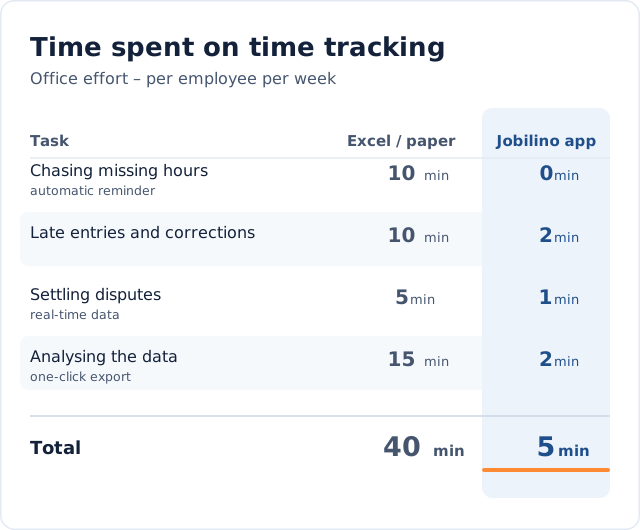
The result of this example:
- With Excel, assuming 40 minutes per person per week, the team (employees + admin) spends that time solely on the process of time tracking.
- With 15 employees, that amounts to 10 hours per week.
- Per month we are talking about around 40 hours – roughly a full working week of a full-time employee!
Multiply that by the average hourly rate of your employees – and plug in your own time values. You will find that the cost of a modern time-tracking app (which often costs only a few euros per user per month) is usually a bargain compared to the labour costs you are burning purely on managing Excel spreadsheets.