
Replace time tracking in Excel – from the spreadsheet to a system that captures data where the work happens
Excel was good enough when you had three employees and one project. Now you have fifteen people across four sites and spend hours every week copying figures together and fixing formulas. Jobilino replaces your Excel spreadsheet with a system in which working hours are recorded directly on the job – not two days later in the office.
- Real-time tracking instead of entering data into cells after the fact
- Automatic project assignment instead of manual sorting into columns
- Ready-made payroll exports instead of formula checking and consolidation
Replace spreadsheets with digital time tracking – with real-time recording, project assignment and ready-made payroll exports.
The 7 Weaknesses of Excel for Time Tracking
Excel is a great tool – but not for time tracking. With more than a handful of employees, problems arise that no spreadsheet can solve.
- Working hours are entered retrospectively – from memory on Friday evening, not in real time while on the job
- Everyone types into a different file or spreadsheet tab – at the end of the month all files have to be consolidated
- Formulas are accidentally overwritten, rows shifted, cells incorrectly formatted – and the errors only come to light during the payroll review
- Project hours can only be allocated with additional columns and manual maintenance – with multiple sites or clients this becomes prohibitively time-consuming
- Excel cannot prove that an employee was actually on site – no timestamp, no location, no tamper-proof record
- Overtime and balances have to be calculated using formulas – a single error in the formula distorts the entire month
- During a regulatory inspection, an editable Excel file is not a reliable record – every cell can be altered at any time
What changes when you replace Excel with Jobilino
No spreadsheet, no consolidation, no formula repair – just a system that delivers ready-to-use data.
What moving off Excel brings your business
Retrospective entry → real-time tracking
Instead of typing times into cells on a Friday, employees clock in the moment work begins. The data is accurate because it is captured at the right moment.
Consolidation → one system for everyone
No merging of files, no spreadsheet tabs per employee, no versions. All entries land automatically in the same dashboard – filterable by employee, project or time period.
Formula errors → automatic calculation
Overtime, balances and break times are calculated automatically. No incorrect cell format, no overwritten formula, no Excel error distorting the entire month.
Manual assignment → project selection at clock-in
Instead of sorting project hours into columns at the end of the month, the employee selects the project at the start. Post-calculation and client billing are based on exact entries – not on estimates in cell D14.
Editable file → tamper-proof record
Every entry has a timestamp that cannot be altered. Subsequent corrections are logged. In the event of a regulatory inspection, facts count – not cells.
Weekly office hours → Export at the touch of a button
Instead of spending three to five hours a week gathering, checking and correcting data, you export finished monthly reports in minutes. Your tax advisor receives a clean file.
How to replace Excel in your business
-
Create an account, set up employees and projects
Transfer your employee list and project structure into the system. Takes less than an hour – and is the last manual data entry you will ever have to do.
-
Distribute the app – employees clock in starting tomorrow
Employees install the app, select their language and clock in digitally. No Excel training required – start, stop, select project.
-
Ban the Excel file from the office
From the very first month with Jobilino, you have ready-made reports at the touch of a button. The old Excel file is no longer needed – but it is not gone either, should you ever need it again.
Features of moving off Excel at a glance
Real-time tracking
Working hours are recorded at the moment work takes place – via app, NFC or terminal. Not two days later in a spreadsheet cell.
Automatic project assignment
When clocking in, the employee selects the project. With NFC tags, the assignment is automatic. No column D, no pivot table, no rework.
NFC Location Proof
Excel cannot prove that someone was on site. An NFC tag at the deployment location can – physical proof of presence without GPS.
Offline Functionality
Excel requires a computer. Jobilino only needs a smartphone – and works without an internet connection too. On construction sites, in basements and at clients' premises.
Tamper-Proof Audit Trail
In Excel, anyone can change any cell. In Jobilino, every change is logged with a timestamp and a reason. The difference when a regulatory inspection takes place.
28 Languages
Albanian, Bulgarian, Croatian, Czech, Danish, Dutch, English, Finnish, French, Georgian, German, Greek, Hungarian, Italian, Latvian, Macedonian, Norwegian, Polish, Portuguese, Romanian, Russian, Serbian, Slovak, Somali, Spanish, Swedish, Turkish and Ukrainian. Excel only speaks the language in which it is installed.
Automatic overtime and balances
No overtime formula that fails on a public holiday. Jobilino calculates automatically – accurately and transparently.
Ready-made payroll exports
Export monthly summaries as CSV or Excel. The irony: in the end you receive an Excel file – but one you did not have to create yourself.
From spreadsheet to dashboard
What used to be a month of work in Excel is here all along – and goes to payroll with one click.
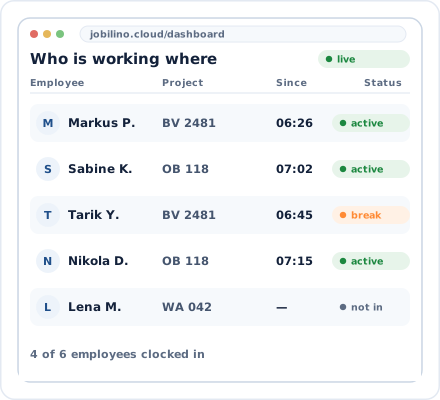
Dashboard instead of spreadsheet
Real-time overview instead of monthly consolidation
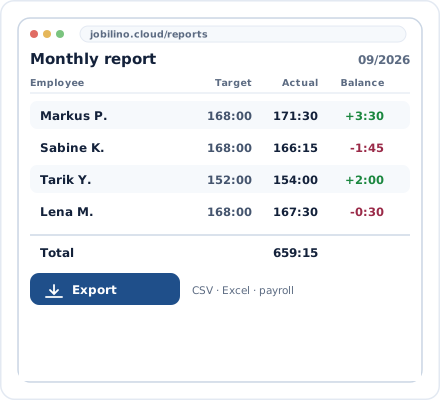
Ready-made payroll export
One click instead of three hours of formula checking
Leave Excel behind, not forgotten
Jobilino exports in the formats your tax adviser and payroll office are familiar with.
CSV and Excel export
Ready-made hour evaluations in the format your payroll office is used to – just without the errors
iOS and Android
The app works on all common smartphones – no computer with Excel required
Web Dashboard
Management and analysis in the browser – from any device, without software installation
GDPR-compliant
European servers, encrypted data – more secure than an Excel file on the desktop
Industries leaving Excel behind
Businesses with multiple construction sites, locations or client deployments in particular reach the limits of Excel.
Frequently asked questions about replacing Excel
Can I import my existing Excel data?
Will I still get an Excel file at the end for my accountant?
How much time do I save per week compared to Excel?
Does Jobilino work without internet access?
Is Jobilino more secure than an Excel file?
Can employees use the app in their own language?
What does it cost to replace Excel with Jobilino?
Do I need an IT department for the migration?
What is an alternative to Excel for time tracking?
Replace Excel with Jobilino – try it free now
Register, distribute the app – and from next week you no longer need an Excel spreadsheet for working hours. No contract commitment and no credit card.
Prefer to call right away? +43 664 5031382