
Features for Time Tracking and Staff Scheduling
From mobile time tracking via app, NFC and terminal to digital Staff Scheduling: Jobilino brings together all the features that businesses with mobile teams truly need in their day-to-day operations – clearly structured and GDPR-compliant.
- Mobile time tracking via app, NFC or terminal
- Digital Staff Scheduling with target/actual comparison
- New: job management and an AI assistant for staff scheduling
- Project hours, holidays and reporting in one system
All Jobilino features for time tracking and Staff Scheduling – in one system for teams working outside the office.
Scattered tools waste time and clarity
Hours in Excel, shifts in WhatsApp, leave on paper – anyone working with multiple isolated solutions loses time piecing things together and risks data being lost.
- Working hours and duty rosters are stored in separate systems
- Planned shifts and actual working hours cannot be reconciled
- Paper timesheets and Excel spreadsheets lead to transcription errors
- Nobody has a central overview of the team, projects and absences
- Preparing payroll takes up unnecessarily many hours every month
All features in one platform
Jobilino connects time tracking, Staff Scheduling and workforce management – so that recording, planning and reporting work together instead of running side by side.
With Jobilino, your employees record their working hours directly on site – via app, NFC tag or stationary terminal. Every entry can be assigned to projects, orders and locations, ensuring clean data for billing and post-calculation.
At the same time, you use Staff Scheduling to schedule your team's assignments and compare planned shifts directly with recorded times. You book client jobs one-off or recurring straight into the plan, and your staff complete them on site with photos and the client's signature. Joby, the AI assistant in staff scheduling, answers questions about the plan in plain language – such as who can stand in on Tuesday. Leave management, photo documentation and reports are all integrated in the same system. All data is stored in a GDPR-compliant manner on servers in the EU and Austria respectively.
What Jobilino brings your business
Less paper and Excel
Timesheets, shift lists and holiday requests are handled digitally instead of on paper.
Fewer queries
Team, administration and scheduling work with the same up-to-date data.
Clean billing
Recorded times and project hours can be exported directly.
More transparency
Times, shifts, projects and absences centrally in one place.
Quick Setup
Up and running in under 30 minutes – no complicated configuration required.
GDPR-Compliant
Encrypted storage on servers in the EU and Austria respectively.
How you work with Jobilino
-
Create a Team
Import employees, define roles and departments.
-
Plan & record
Plan shifts and record working hours via app, NFC or terminal.
-
Assign
Assign times directly to projects, orders or locations.
-
Analyse & export
Use reports and exports for payroll and controlling.
Features of Jobilino at a glance
Time Tracking via App
Employees record their working hours directly on their smartphone – simply and in real time.
NFC Check-In
A quick scan of the NFC tag starts or stops the time at the deployment location.
Terminal
Stationary check-in and check-out on a tablet for locations with fixed workstations.
Staff Scheduling
Create, publish and reconcile shift schedules with time tracking.
Job Management
Book client jobs one-off or recurring, complete them on site with photos and a signature, and turn them into invoice lines.
AI Assistant Joby
Ask questions about the schedule in plain language, find cover and build plans from a sentence – AI processed in the EU, available as an add-on.
Project Time Tracking
Track hours per client, order or project for accurate billing and post-calculation.
Leave Management
Submit, approve and monitor leave requests and balances digitally.
Photo Documentation
Document work and materials directly against recorded time with a photo.
Login via SMS
Sign in without an e-mail address – ideal for trade and mobile teams.
Offline Function
Entries are saved even without a network connection and automatically synchronised later.
Evaluation & Export
Filter, evaluate and export recorded times as CSV or PDF.
Multilingual App
Available in 28 languages: Albanian, Bulgarian, Croatian, Czech, Danish, Dutch, English, Finnish, French, Georgian, German, Greek, Hungarian, Italian, Latvian, Macedonian, Norwegian, Polish, Portuguese, Romanian, Russian, Serbian, Slovak, Somali, Spanish, Swedish, Turkish and Ukrainian.
Jobilino in practice
Record, plan, evaluate – the three areas where Jobilino is used every day.
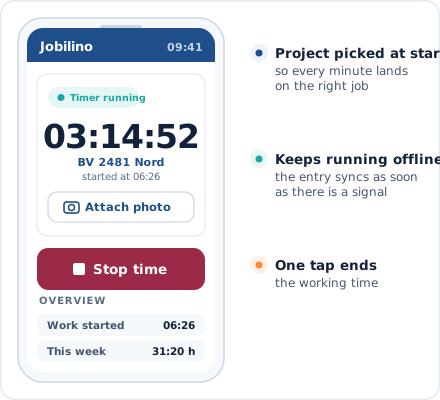
Mobile Time Tracking
Start and stop in seconds directly on your smartphone
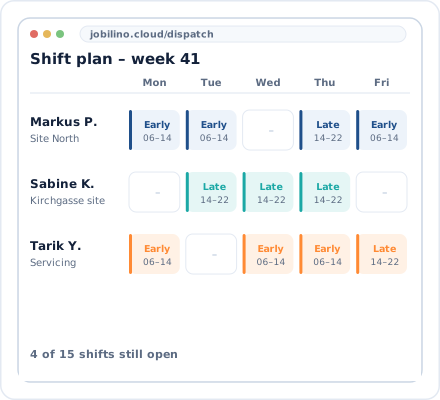
Shift schedule in the dashboard
All assignments, teams and locations at a glance
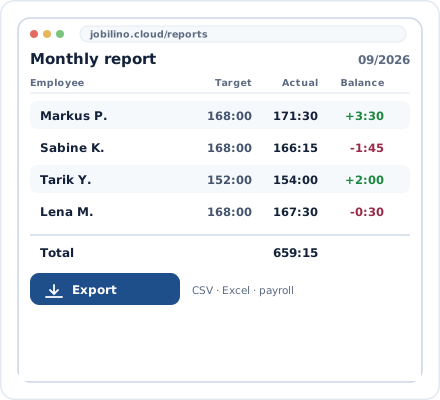
Reporting & Export
Clean target/actual data for payroll processing
Integrations & Compatibility
Jobilino fits into existing processes and runs on all devices.
CSV & PDF Export
Standardised outputs for payroll accounting and controlling.
Web + Mobile
Available across platforms on iOS, Android, and in the browser.
NFC & Terminal
Hardware-based recording can be seamlessly combined with the app.
Suitable Industry Solutions
See how the features are used in your industry.
Frequently Asked Questions About the Features
What features does Jobilino offer?
Can time tracking and Staff Scheduling be connected?
Do the features work without an internet connection?
How quickly can Jobilino be set up?
Is Jobilino GDPR-compliant?
Which types of companies are the features suited for?
Try All Features Now
Experience time tracking and Staff Scheduling in one system – ready to go in under 30 minutes, free of charge and non-binding.
Prefer to call right away? +43 664 5031382