
Document Winter Services: Clearing and Gritting Log, Time Tracking and Proof per Property
In winter services, being liable means being able to show when a property was cleared and gritted – not just who worked how long. Jobilino logs every operation automatically: an NFC check-in at the property, a photo of the cleared pavement, the time down to the minute. That becomes the clearing and gritting log your clients want to see every month – and the record that counts when a claim is filed.
- Clearing log with photo proof
- NFC check-in at the property
- Proof for property managers
Photo as proof of clearance
After clearing, the employee photographs the cleared pavement directly in the app. The photo is automatically linked with a timestamp and the property. In the event of a liability claim, this is the strongest evidence a winter maintenance company can provide.
NFC tag at every property
An NFC tag is attached to every property on the route. The employee holds up their smartphone and is clocked in. This proves physical presence – without GPS, without an internet connection, and even at 4 a.m. in sub-zero temperatures.
Route recording with property changes
Winter maintenance employees cover routes with 10 to 30 properties. The app allows any number of property changes per deployment. Each stop is documented separately: property, arrival, departure, duration.
The problem
Why a Timesheet Is Not a Clearing and Gritting Log
Winter services involve two separate things: working hours and proof of the work performed. A timesheet reading „snow clearance 05:00–07:00“ documents the hours – but not which property was cleared when, whether grit was applied, or how it looked afterwards. If someone slips, those are exactly the questions: When was it last cleared? What was spread? Was anyone on site at all? A handwritten sheet filled in hours later from memory does not carry that burden of proof.
- Deployments take place at 4 or 5 in the morning – timesheets are filled in from memory hours later
- Employees cover routes with 10 to 30 properties – without a system, no one knows when each property was cleared
- In liability cases, proof is missing: exactly when was the clearing done? Was the employee actually on site? Is there a photo?
- Property managers and clients require deployment reports per property – timesheets cannot provide this documentation
- Spontaneous deployments during snowfall are not recorded properly – because the timesheet is in the vehicle and gets forgotten
- Winter service hours must be billed separately from cleaning and property maintenance – on a single sheet, this is barely separable
The solution
The Digital Clearing and Gritting Log from Jobilino
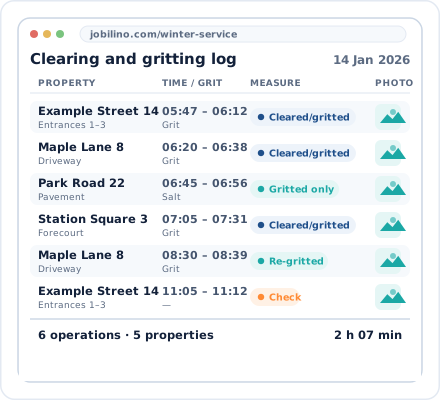
The employee drives their route. At each property, they hold their smartphone up to the NFC tag at the entrance or open the app and clock in. Once they have cleared and gritted, they take a photo of the cleared pavement – directly within the app. When leaving, they clock out and drive to the next property. The system automatically records: property, arrival time, departure time, duration and photo. The office can see in real time which properties have already been cleared. And at the end of the month, the client receives a clean operations report with all clearing and gritting times, durations and photos – as PDF, Excel or CSV.
Deployment reports per property
Monthly reports per residential complex or client at the push of a button: How often was it cleared? When? For how long? With which photo? As CSV, Excel or PDF – ready for property managers and clients.
Record winter services separately from cleaning
Many businesses offer winter services and cleaning with the same employees. In Jobilino, you set up winter services as a separate project or service type. The hours are clearly separated – for invoicing, payroll and internal reporting.
How it works
How the Clearing and Gritting Log Is Created – Step by Step
-
Attach NFC tags to properties
Before the season, NFC tags are attached to the properties on the route – at the entrance, on the bin store door or on the lamp post. Attach once, works all winter long.
-
Start assignment – drive the route
When it snows, the employee starts his assignment in the app and drives his route. At each property he clocks in via NFC, clears the snow and grits.
-
Take a photo of the cleared pathway
After clearing, the employee photographs the result directly in the app. The photo is automatically assigned to the property and the timestamp.
-
The office sees all assignments in real time
In the dashboard, the dispatcher can see which properties have already been cleared and which are still outstanding. At the end of the month, reports are exported per property.
Your benefits
- Clearance proof by photo – evidence documentation for liability cases with timestamp and property assignment
- NFC at the property – physical proof of attendance even at 4 a.m., without GPS and without internet
- Route tracking – 10 to 30 properties per deployment, every stop documented separately
- Deployment reports for property management companies – monthly proof of services per property at the touch of a button
- Spontaneous deployments recorded accurately – when snowfall occurs, employees start the deployment in the app, not on a timesheet the next day
- Winter maintenance separated from cleaning – clear separation of service types for billing and payroll
- 28 languages – winter service staff from Serbia, Romania, Croatia or Turkey work in their own language
- Real-time dispatching – see in the dashboard which sites have been cleared and which are still pending
For whom
Which winter service companies is Jobilino suitable for?
Jobilino is used by winter service companies, property maintenance firms with winter services, and facility management businesses – from 3 to 100 employees, from 10 to 300 properties. Typical areas of use: snow clearance of footpaths, pavements and driveways, gritting services, roof avalanche protection, and icicle removal. Particularly useful for businesses that have taken on clearing and gritting duties under contract with property managers and owners, that need to prove every operation without gaps, and that want to bill winter service hours separately from cleaning and property maintenance.
Set it up before the first snow – try winter services free of charge
NFC tags at your properties, a photo function in the app – and from the first snowfall you will have a complete clearing and gritting log for every property. Setup takes an afternoon. No contract commitment and no credit card required.
Prefer to call right away? +43 664 5031382
- No setup fee
- cancel monthly
- GDPR-compliant