Work Hours App for Employees – so easy to use that no explanation is needed
The best time-tracking app is the one every employee uses from day one. No training, no manual, no IT support. Jobilino is built exactly that way: open the app, tap Start, select a project – done. In the employee's own language, even without internet and without needing to know their email address.
- One tap – working time is running, project is assigned
- 28 languages – every employee in their own language
- Usable without an email address, without training, without internet
The app employees actually use – because it works within seconds, speaks 28 languages and runs offline too.
Why employees don't use many time-tracking apps
The app is installed – but half of the employees still don't clock in. That's not a matter of willingness; it's a matter of the app.
- The interface is only in German – Serbian, Croatian or Turkish employees do not understand which button they are supposed to press
- Registration requires an email address – many employees on the construction site or in cleaning do not have a work email
- The app needs internet – on the construction site in the shell or in the basement, nothing works
- The interface is too complex – menus, settings, timer variants. An employee on the construction site wants to tap, not configure
- Employees cannot see their own hours – they clock in blind and only find out at the end of the month what was recorded
An app built for employees – not for HR managers
Jobilino is the app employees actually use – because it works from the very first moment.
What the working-time app brings your business
Interface understood in seconds
Start, pause, stop, select project. That is the entire interface. No employee needs an introduction – whether tradesperson, cleaner or technician.
28 languages – choose your own language at login
Albanian, Bulgarian, Croatian, Czech, Danish, Dutch, English, Finnish, French, Georgian, German, Greek, Hungarian, Italian, Latvian, Macedonian, Norwegian, Polish, Portuguese, Romanian, Russian, Serbian, Slovak, Somali, Spanish, Swedish, Turkish and Ukrainian. The app adapts – the employee does not have to.
Usable without an e-mail address
Many employees on construction sites and in cleaning services do not have a business e-mail address. Jobilino does not need one – access is created by the office and the employee logs in with a code.
View personal hours and balances
In the app, the employee can see their booked hours, the current hours balance and their overtime. Transparency instead of flying blind – fewer disputes at the end of the month.
Leave requests directly in the app
Employees submit leave requests with a tap in the app. The supervisor receives a notification and approves with a single click. Remaining leave is visible in the system.
Offline-capable – clock in and out even without a connection
The app saves all bookings locally and synchronises automatically. On construction sites, at client locations and in areas without mobile coverage, not a single entry is lost.
How the employee experiences the app
-
Install the app and log in
The employee installs the app, enters their access code and selects their language. Duration: under two minutes. No e-mail, no password reset.
-
Start of work – tap and get going
Open the app, tap Start, select a project. The time tracking begins. At the NFC tag on site, a brief hold of the smartphone is all it takes.
-
Breaks and project switching
Tap Pause for a break. When switching projects, select the new project. One tap per action – nothing more.
-
End of day – tap Stop
At the end of the day, tap Stop. The app displays the booked hours. The employee sees their daily entry immediately.
Features of the working-time app at a glance
Start-Stop Time Clock
Three buttons: Start, Pause, Stop. The current working time is displayed live. No timer setup, no settings, no menu navigation.
Project Selection
When starting, the employee selects the project from a short list. To switch projects, they tap once. The projects are set up by the office – the employee does not need to create anything.
Personal Hours Overview
Daily, weekly and monthly overview of the employee's own booked hours. The employee can see at any time how many hours they have worked this week and what balance is outstanding.
Leave Request
Employees tap on leave, select the time period and submit the request. The manager approves with a single click. Remaining leave is visible in the app.
NFC Clock-In at the Work Site
At cleaning sites, construction sites or customer locations: hold your smartphone up to the NFC tag – clocked in. No internet, no GPS, no need to actively open the app.
Photo Documentation
Add photos directly in the app – construction progress, cleaning results, damage reports. The photos are automatically assigned to the project.
Offline Mode
All bookings are saved locally and synchronised automatically. Employees notice no difference – the app works identically whether or not a network connection is available.
Notifications
Employees are informed when their leave request has been approved, when a booking needs to be corrected, or when a shift change is upcoming.
The app from the employee's perspective
This is what the employee sees on their own phone: clock in, check their own hours, request leave.
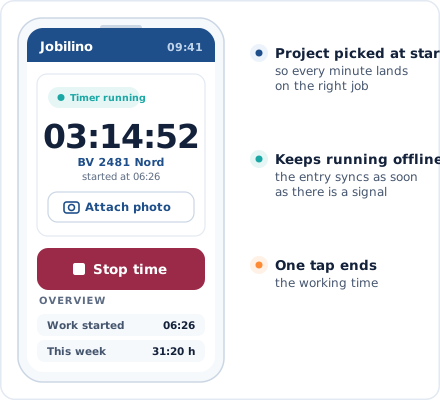
Time Clock View
Start, Break, Stop – with project selection
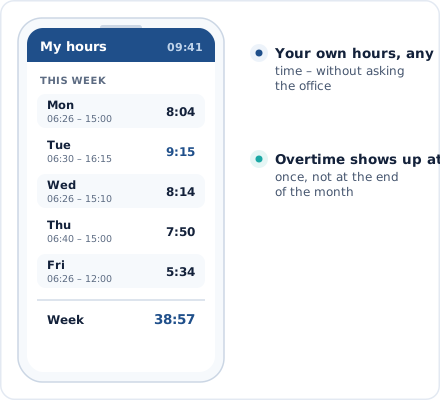
Personal hours overview
Daily and weekly overview of booked times
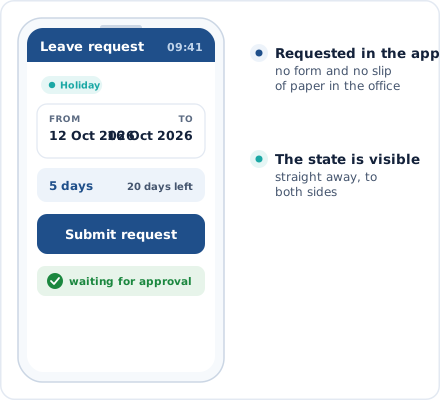
Holiday request
Select a period and submit – with one click
Works with any smartphone
The app runs on the devices your employees already have.
iOS and Android
All common iPhones and Android smartphones – including older models
NFC-enabled
For location verification via NFC – compatible with almost all smartphones from 2015 onwards
Usable without an email address
Access via code from the office – no personal email address required
Combinable with terminal
Employees without a smartphone clock in at the terminal or via NFC tag
Employee app by industry
The app is used in industries where employees do not work at a desk.
Frequently asked questions about the working hours app for employees
Do employees need an email address for the app?
In which languages is the app available?
Can employees view their own hours?
Does the app work without an internet connection?
What happens if an employee forgets to clock in?
Does every employee need their own smartphone?
Can employees request holiday through the app?
How long does it take before an employee can use the app?
Try the working hours app free of charge now
Distribute the app, invite employees – and from tomorrow everyone clocks in digitally. In their language, even without internet and without an email address. No contract commitment and no credit card required.
Prefer to call right away? +43 664 5031382