
Time Tracking App – Record Working Hours on the Go, Assign Them to Projects and Evaluate Them in Real Time
Your employees open the app, tap Start – and the clock is running. Breaks, project changes and end of work are each recorded with a single tap. All times land in the system immediately and are visible in the office – filterable by employee, project, location or time period. No timesheets, no Excel and no rework.
- One tap – working time starts, project-based and in real time
- Offline-capable – works even on construction sites and in basements
- 28 languages – ready to use immediately for international teams
Record working hours directly at the place of deployment – via smartphone, in real time and project-related.
Why Timesheets and Excel Fail in the Field
As long as employees are sitting in the office, almost any time-tracking solution works. As soon as they work outside – on construction sites, at clients' premises, in cleaning facilities – the system breaks down:
- Timesheets are filled in from memory on Friday evenings – working hours are inaccurate and barely verifiable
- Paper gets lost, gets wet, becomes illegible – no timesheet survives long-term on a construction site or in a service vehicle
- Excel spreadsheets in the office are filled in manually – formula errors, overwritten cells and data loss are a daily occurrence
- Project hours are entered as a flat figure rather than assigned precisely – post-calculation and client billing are based on estimates
- The office spends several hours every week chasing missing entries, deciphering figures and compiling data for payroll processing
- In the event of a regulatory inspection, complete and unbroken records are missing – paper timesheets are not accepted as audit-proof documentation
The Solution: Time Tracking by App with Jobilino
Jobilino replaces timesheets, Excel and after-the-fact guesswork with an app your employees will understand in three seconds.
Employees open the app on their smartphone, tap Start and select the project. The clock is running. When taking a break they tap Pause, when changing projects they select the new project, and at the end of the day they tap Stop. That is the entire operation – no training, no manual, no IT knowledge required.
All recorded times appear in real time in the office's online dashboard. The site manager can see which team is working on which construction site. Administration can see how many hours have been logged on Project X. Payroll exports ready-made monthly reports. And all of this happens automatically – because the data is created where the work takes place, not two days later on a piece of paper.
What time tracking by app brings your business
No more rework in the office
No deciphering timesheets, no copying and pasting Excel spreadsheets, no chasing down missing entries. The data arrives clean and complete from the app – ready directly for payroll and invoicing.
Real-time overview of all assignments
In the dashboard you can see at any time who is currently working, on which project and at which location. No more daily phone calls and WhatsApp messages – the system displays the current status.
Project hours at the touch of a button
Every hour is assigned to a project, client or job at the point of clocking in. Reports for post-calculation and client billing are generated automatically – not through manual sorting in the office.
Offline-capable for every location
No mobile signal on the construction site? No Wi-Fi in the basement? The app saves all bookings locally and synchronises automatically as soon as the connection is restored. Not a single entry is lost.
Multilingual for international teams
The app runs in 28 languages. Someone with only a few words of the local language still understands every button and books their hours correctly – which saves the office chasing people and correcting entries afterwards.
Regulatory-compliant and audit-proof
Complete, digital documentation of all working hours with timestamps and optional location verification. In the event of an inspection, all data is instantly retrievable – not after hours of searching through filing folders.
How Time Tracking by App Works
-
Install the app and log in
The employee installs the Jobilino app from the App Store or Play Store and signs in with their credentials. The app starts automatically in their language. Duration: under two minutes.
-
Select a project and clock in
At the start of work, the employee opens the app, selects the project or client, and taps Start. The working time begins. For breaks, they tap Pause. When switching projects, they select the new project.
-
End of the day – tap Stop
At the end of the working day, the employee taps Stop. The app saves all bookings – even if no internet connection was available in between. The data is synchronised automatically.
-
Office evaluates and exports
In the online dashboard, the administration sees all times in real time. Monthly overviews, project reports and hour evaluations are exported as CSV or Excel – ready for payroll and billing.
Features of the time-tracking app at a glance
Start-stop time clock
One tap on Start, one tap on Stop. Breaks are recorded separately. The operation is so simple that no employee needs an explanation – whether tradesperson, cleaner or technician.
Project assignment when clocking in
At the start, the employee selects the project, the client or the job. If they switch projects during the day, they tap once on Change Project. Every minute is allocated to the correct project.
Crew Time Capture
The site supervisor or foreman records the working hours of his entire crew using a single device. Not every construction worker needs their own smartphone – the foreman clocks the whole team in and out collectively.
Full Offline Functionality
The app works without an internet connection. All entries are saved locally on the smartphone and synchronised automatically as soon as mobile data or Wi-Fi becomes available again. Built for construction sites, basements, and areas without a stable network.
NFC Location Verification
In addition to the app, the employee can hold their smartphone up to an NFC tag at the deployment location. This proves physical presence at a precise point – more privacy-friendly than GPS and ideal for cleaning sites and fixed locations.
GPS location when clocking in/out
Optionally, the GPS location is recorded when clocking in and out – only at the moment of the booking, not continuously. Ideal for field-service companies that need to prove that an employee was on-site at the customer's premises.
Photo documentation
Employees can store photos directly in the app when clocking in or during an assignment – as proof of service, quality documentation, or damage reports. The photos are immediately saved in the system and assigned to the relevant project.
28 languages
Albanian, Bulgarian, Croatian, Czech, Danish, Dutch, English, Finnish, French, Georgian, German, Greek, Hungarian, Italian, Latvian, Macedonian, Norwegian, Polish, Portuguese, Romanian, Russian, Serbian, Slovak, Somali, Spanish, Swedish, Turkish and Ukrainian. Every employee works in the language they feel comfortable with. The language setting is applied automatically on first login.
The App in Practice
The three screens your employees use every day: start the clock, pick a project, clock in with an NFC tag.
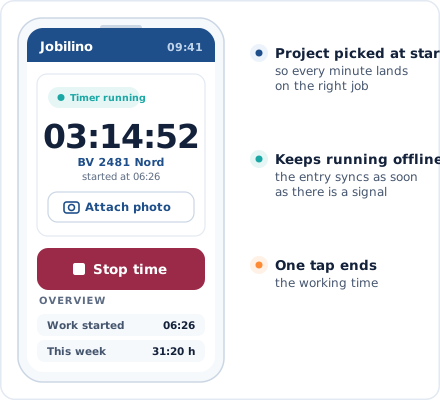
Time Clock View
Start, pause and stop in seconds – with project selection
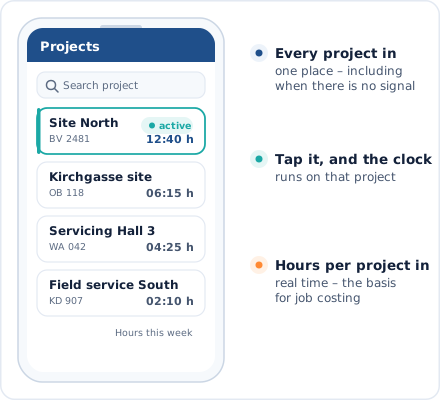
Project Overview
All active projects at a glance – tap and get started
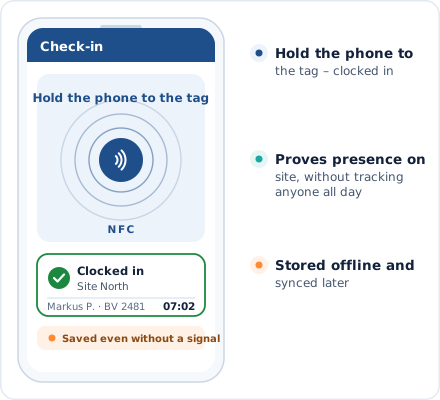
NFC Check-In
Hold your smartphone up to the tag – clocked in
Fits Into Your Daily Work Routine
The app replaces your timesheets – not your entire infrastructure.
iOS and Android
The app works on all common smartphones – iPhone and Android, even on older devices
CSV and Excel Export
Ready-made hours evaluations and monthly overviews in the format of your payroll accounting
Online Dashboard
Evaluations, administration and employee management in the browser – on any device
NFC Tags
Affordable NFC stickers at deployment sites – compatible with any NFC-enabled smartphone
Time Tracking by App for Your Industry
Jobilino is used in industries where employees do not sit at a desk all day.
Frequently Asked Questions About Time Tracking by App
Does the time-tracking app also work without internet?
Does every employee need a smartphone?
How easy is the app for employees with no IT experience?
Can I assign working hours to a project via the app?
Which smartphones are supported?
Is the time-tracking app GDPR-compliant?
How quickly can my team start using the app?
What does time tracking via app cost?
Try time tracking via app for free now
Download the app, set up your projects and let your employees digitally record their first hours tomorrow. Ready to go in minutes – no contract commitment and no credit card required.
Prefer to call right away? +43 664 5031382