
Digital Time Tracking – Record working hours where the work happens, and evaluate them in real time at the office
Digital time tracking means: no timesheets, no Excel, no retroactive entries. Your employees clock in and out via app on their smartphone, via NFC tag at the job site, or via terminal at the entrance. Every hour is automatically assigned to the correct project. The office sees in real time who is working. And at the end of the month, finished reports for payroll are ready at the push of a button.
- 3 recording methods: app, NFC and terminal – depending on the location
- Project assignment, location verification and photo documentation
- Offline-capable, 28 languages, usable without e-mail
Switch from timesheets and Excel to a digital system – via app, NFC or terminal, project-based and available in 28 languages.
Why timesheets and Excel are not digital time tracking
Some businesses believe they have a digital time tracking solution because timesheets are transferred into an Excel spreadsheet. That is not digitalisation – that is manual data entry.
- Timesheets are filled in by hand and brought to the office on Friday – the data is two to five days old by the time it arrives in the system
- Excel spreadsheets are filled in manually – with formulas that break on a public holiday and cells that are accidentally overwritten
- No one knows in real time who is currently working – the overview only emerges at the end of the month once all the sheets have been collected
- Project hours are estimated rather than recorded precisely – post-calculation and client billing are based on assumptions
- In the event of an official inspection, a handwritten note or an editable Excel file is not a reliable piece of evidence
- International employees who cannot read German fill out forms incorrectly or not at all
What genuine digital time tracking means
Digital time tracking means: the data is created where the work happens – not in the office.
What digital time tracking brings your business
Real time instead of retrospect
You can see at any time who is currently working, on which project, and since when. Not only on Friday when the paper slips arrive – but right now, at this very moment.
Automatic instead of manual
Overtime is calculated, breaks deducted, balances updated. No Excel formula that breaks on a public holiday. The system does the maths, not the office.
Assigned instead of guessed
When clocking in, the employee selects the project. With NFC tags, the assignment is automatic. At the end, you know exactly how many hours were spent on which order.
Verifiable rather than alleged
Every entry has a tamper-proof timestamp. Corrections are logged. During a regulatory inspection: open the dashboard instead of searching through folders.
Instantly rather than in hours
Payroll preparation at the push of a button: export monthly summaries as CSV or Excel. No compiling, no correcting, no manual re-entry.
For everyone, not just for Germans
The app is available in 28 languages. Login via mobile number instead of email. No employee can say: I couldn't log in. I didn't understand the app.
How digital time tracking works with Jobilino
-
Choose your time-tracking method
App for mobile teams on construction sites and at client locations. NFC tags for fixed work sites such as cleaning properties. Terminal for workshops, warehouses and production. Or all three combined.
-
Employees clock in digitally
One tap in the app, one scan at the NFC tag, or one click at the terminal. Select a project, working time starts. Even offline, even without an email address, even in Serbian.
-
Data flows in real time
All bookings are immediately visible in the dashboard. Who is working where? How many hours on project X? Are there any overtime hours? The office sees everything without having to make a single call.
-
Export reports
Monthly overviews per employee, project evaluations per client, overtime reports. As CSV or Excel – ready for your tax advisor and payroll office.
Features of digital time tracking at a glance
Time tracking via app
Clock in on your smartphone – start, break, stop, select project. Offline-capable, available in 28 languages, usable without an email address. Works on every iOS and Android device.
Time tracking via NFC
NFC tags at the worksite prove physical presence. Hold up your smartphone – clocked in. No GPS, no internet, privacy-friendly. Tags cost a few euros and last indefinitely.
Time tracking via terminal
An Android tablet at the entrance to the workshop or production hall. The employee taps their name – clocked in. No smartphone required, no chip, no card.
Project assignment
Every hour is assigned to a project at the point of clocking in. Automatically with NFC. The foundation for post-calculation, client billing and better quotes.
Proof of location
NFC proves physical presence on-site. GPS optional when clocking in. Photo documentation as proof of service. For clients, property managers and authorities.
Approval Workflow
Supervisors review and approve times before they are passed on to payroll. Corrections and amendments are logged with a reason.
Leave Management
Employees submit leave requests in the app. Supervisors approve with a single click. Remaining leave is calculated automatically. No paper forms, no Excel spreadsheets.
28 languages, without e-mail
Albanian, Bulgarian, Croatian, Czech, Danish, Dutch, English, Finnish, French, Georgian, German, Greek, Hungarian, Italian, Latvian, Macedonian, Norwegian, Polish, Portuguese, Romanian, Russian, Serbian, Slovak, Somali, Spanish, Swedish, Turkish and Ukrainian. Login via SMS code instead of email.
Digital time tracking in practice
Three ways a working time is created and reaches the office – in the app, via NFC tag, in the dashboard.
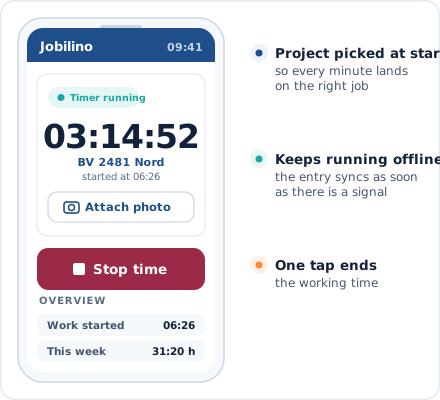
App time clock
Start, pause, stop with project selection
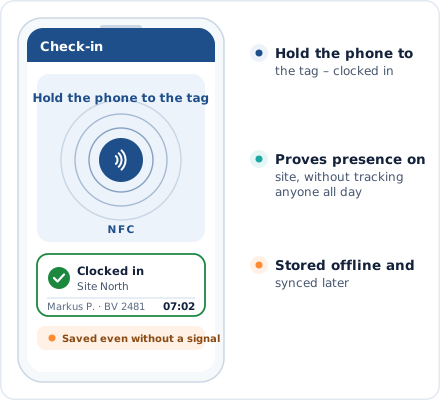
NFC at the deployment location
Hold up your smartphone – clocked in
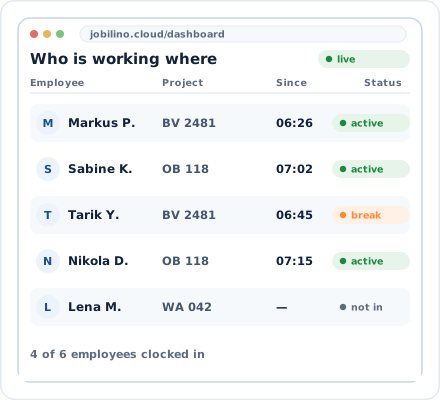
Dashboard
Real-time overview of all teams
Fits your business
Digital time tracking replaces timesheets and Excel – not your entire infrastructure.
CSV and Excel export
Ready-made reports in your payroll format – the last Excel file you will never have to create yourself
iOS, Android and web
App on every smartphone, dashboard in the browser on any device
NFC tags
Affordable stickers at deployment sites – compatible with all NFC-enabled smartphones
GDPR-compliant
European servers, encrypted data, GPS only when clocking in/out, no permanent tracking
Digital time tracking by industry
Jobilino is used in industries where employees do not sit at a desk all day.
Frequently asked questions about digital time tracking
What is digital time tracking?
Is digital time tracking mandatory?
Which recording method is right for my business?
Does digital time tracking work without internet access?
Do employees need an email address?
In which languages is digital time tracking available?
How quickly can digital time tracking be set up?
What does digital time tracking cost?
Try digital time tracking for free now
Register, choose your recording method, add employees – and starting tomorrow, timesheets are a thing of the past. No contract commitment and no credit card required.
Prefer to call right away? +43 664 5031382