
Time Tracking with Approval – Review, Approve and Only Then Bill Working Hours
Employees record their hours via app, NFC or terminal. Supervisors review the entries and approve them. Only after approval do the hours flow into payroll processing and project evaluation. Corrections and amendments are logged with a reason. This ensures that only reviewed, accurate data enters billing – and you retain full control over working hours, overtime and project hours.
- Only approved times are billed
- Corrections with mandatory justification and audit log
- Overtime and additions under control
Record, review and approve working hours before payroll – for clean wage data and controlled overtime.
What happens when working hours are processed without review
Without an approval process, all recorded times flow directly into payroll – whether they are correct or not.
- Incorrect entries are only noticed once the payroll has already been processed – corrections take twice as much time
- Overtime is recorded without a manager having reviewed or approved it – costs spiral out of control
- Amendments are submitted without any explanation – no one knows whether the employee genuinely forgot to clock in or whether the time was inflated after the fact
- Project hours are allocated incorrectly – the post-calculation is inaccurate and the client receives an imprecise invoice
- The administration has no way of checking entries before payroll is processed – errors only come to light during the payroll audit
The solution: time tracking with an approval workflow
An approval step between recording and payroll – so that only verified data enters the wage calculation.
What time tracking with approval brings your business
No more incorrect times in payroll
Supervisors review every entry before it flows into the export. Incorrect bookings, wrong project assignments and forgotten breaks are corrected before payroll – not after.
Overtime under control
Overtime becomes visible before it is billed. The supervisor approves or rejects it – with a reason. No more unpleasant surprises at the end of the month.
Amendments are transparent
If an employee has forgotten to clock in or out, they can add the time retroactively – but only by providing a mandatory reason. The correction is logged and visible to supervisors.
Only approved data in the export
The payroll export contains exclusively approved times. The tax adviser or payroll office receives clean, verified data – without discussions and without rounds of corrections.
Responsibilities clearly defined
Employees record. Managers approve. Administration exports. Everyone knows what their role is – clear processes instead of informal arrangements.
Roles and permissions
Who may approve? Who may only view their own times? Who may export? Role-based permissions ensure that everyone has exactly the functions they need.
How time tracking with approval works
-
Employee records working time
Via app, NFC or terminal – just as usual. The employee clocks in, selects the project and gets to work. The entry is saved in the system.
-
Entry is sent to the approver
The supervisor, team leader or administration sees the entry in the dashboard. Pending approvals are displayed clearly – with timestamp, project and duration.
-
Review, correct or approve
Approve with a single click, correct if necessary, or reject. Corrections are logged with a reason. The employee is notified of the approval or rejection.
-
Export approved times
Only approved entries are taken into account for payroll export and project evaluation. The export contains exclusively verified data.
Features of time tracking with approval at a glance
Approval Dashboard
All open entries at a glance: employee, date, project, duration, overtime. Approve individually or in bulk – with a single click.
Supplementary Entries with Mandatory Reason
Forgotten bookings can be added retrospectively, but only with a reason. The correction is logged separately and marked as a supplementary entry.
Overtime Approval
Overtime is displayed separately and must be approved before billing. No uncontrolled accumulation of overtime accounts.
Rejection with Comment
If an entry is incorrect, the approver can reject it – with a comment to the employee. The employee corrects the entry and resubmits it.
Role-Based Permissions
Employees, team leaders, administration and management each see only what they need. Who is authorised to approve is defined per team or department.
Notifications
Approvers are notified of pending entries. Employees are informed when their times have been approved or rejected.
Audit Log
Every change to a time entry is recorded with a timestamp, user, and reason. Complete traceability for regulatory inspections and internal audits.
Leave Approval
Leave requests and absences are also handled through the approval workflow. Employees submit the request, and managers approve it with a single click. Remaining leave is calculated automatically.
The approval process in practice
This is how an approval runs: pending entries collect, and the manager decides entry by entry.
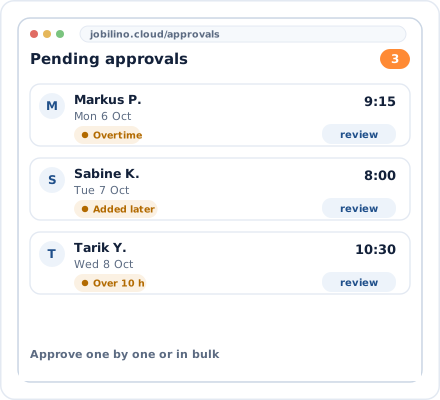
Pending Approvals
All entries to be reviewed at a glance

Approval with a single click
Approve, correct or reject
Fits into your workflows
The approval workflow complements existing time tracking – without changing the recording process itself.
App + NFC + Terminal
Regardless of how time is recorded – the approval process is the same for all methods
CSV and Excel export
Only approved times are exported – unreviewed entries remain in the system
Web Dashboard
Approvals in the browser – at your desk or on the go with your tablet
GDPR-compliant
All data encrypted, role-based access rights, European servers
Approval workflow by industry
Particularly useful for businesses with multiple teams, construction sites or project managers.
Frequently asked questions about time tracking with approval
Who can approve working hours?
What happens if an employee forgot to clock in?
Can I amend times after they have been approved?
Are unapproved times exported anyway?
How are overtime hours handled in the approval process?
Does the approval process also work for holiday requests?
How time-consuming is the approval process for line managers?
What does time tracking with approval cost?
Try time tracking with approval free of charge today
Activate the approval workflow and process only verified hours from tomorrow onwards. No contract commitment and no credit card required.
Prefer to call right away? +43 664 5031382