
Online Time Tracking for Businesses – Record Working Hours Digitally, Evaluate Them Centrally and Invoice Them Cleanly
With Jobilino, your employees record working hours directly at the job site – via app, NFC or terminal. All data is immediately available online: filterable by employee, project, location or time period. Ready-made reports for payroll and invoicing at the touch of a button.
- Working hours via app, NFC or terminal – online and in real time
- Automatic assignment to projects, clients and orders
- Ready-made exports for payroll and accounting
All working hours – digital, centralised and in real time – no matter where your employees work.
What happens when time tracking is not online
Many businesses still record working hours on paper, in Excel or via systems that are not available in real time. The consequences are always the same:
- The office only finds out at the weekend what happened during the week – no real-time overview of ongoing assignments
- Timesheets are filled in from memory and laboriously transferred to Excel in the office – errors and queries are inevitable
- Project hours cannot be evaluated on a daily basis – post-calculation and quotation planning are based on estimates rather than facts
- Payroll preparation takes hours every week instead of minutes – because data has to be gathered from various sources
- During a regulatory inspection, there is no complete, verifiable record of working hours, breaks and deployment locations
The solution: online time tracking with Jobilino
Jobilino digitalises time tracking right where your employees actually work – and makes all data immediately available online.
What online time tracking brings your business
Real-time overview instead of a weekly review
You can see at any time who is currently working, on which project and how many hours have been recorded – not just on Friday, but right now.
Payroll preparation in minutes instead of hours
Export ready monthly summaries and hour evaluations as CSV or Excel – with no manual consolidation and no correction loops.
Clean post-calculation at the touch of a button
Project reports show exactly how many hours are allocated to which client, order, or location – the basis for accurate invoicing and better quotes.
Regulatory evidence retrievable at any time
Complete, digital documentation of all working hours, breaks, and deployment locations – audit-ready and tamper-proof. No more hunting down paper timesheets during an inspection.
Fewer queries from the office
When all hours are recorded in the system in real time, the daily phone calls and WhatsApp messages become a thing of the past: Who is working where? How many hours have been logged? Why is an entry missing?
Access from anywhere – no installation required
The online dashboard works in the browser on any device. The app works on any smartphone. No server in the office, no IT department, no software updates.
How online time tracking works with Jobilino
-
Register and set up
Create your account in two minutes. Set up locations, projects and employees. No IT project, no implementation phase – everything is ready in just a few minutes.
-
Employees record their time
Your employees clock in and out via the app, NFC tag or terminal. When clocking in, they select the project or job. Everything happens in seconds – no training required.
-
Data is available online instantly
All recorded times appear in real time in the online dashboard. Filter by employee, project, location or time period. Bookings recorded offline are also synchronised automatically.
-
Analyse and export
Create monthly overviews, project analyses and hour reports. Export finalised data for payroll and accounting – at the touch of a button, in the format of your choice.
Features of online time tracking at a glance
Time tracking via app
Employees open the app, tap Start – and the working time begins. Breaks, project changes and the end of work are each recorded with a single tap. Works on any smartphone, even offline.
Time Tracking via NFC
NFC tags are attached at deployment locations such as cleaning sites, construction sites, or customer premises. Employees hold their smartphone up to the tag and are clocked in – physical proof of presence without GPS.
Time Tracking via Terminal
At fixed locations such as warehouses, workshops, or offices, employees clock in and out using a stationary terminal. Ideal as a complement to the app and NFC in mixed teams.
Project Assignment When Clocking In
Every hour is assigned directly to the correct project, client, or job. The office no longer needs to sort times after the fact – the assignment happens where the work takes place.
Real-Time Online Dashboard
In the browser you can see the current status at any time: Who is working right now? On which project? How many hours have been logged this week? Filterable by employee, project, location and time period.
Reports and Exports
Monthly overviews per employee, hour evaluations per project, overtime reports – exportable as CSV or Excel. Ready-to-use data for payroll and accounting without any manual rework.
Offline Function with Auto-Sync
No internet on the construction site? No problem. The app saves all entries locally and synchronises automatically as soon as a connection is available again. Online time tracking does not mean that internet access must be available at all times.
Multilingual App
The app is available in 28 languages: Albanian, Bulgarian, Croatian, Czech, Danish, Dutch, English, Finnish, French, Georgian, German, Greek, Hungarian, Italian, Latvian, Macedonian, Norwegian, Polish, Portuguese, Romanian, Russian, Serbian, Slovak, Somali, Spanish, Swedish, Turkish and Ukrainian. Every employee automatically works in their own language.
Insights into day-to-day use
Recorded on site, worked with in the browser – with nothing to install in the office.
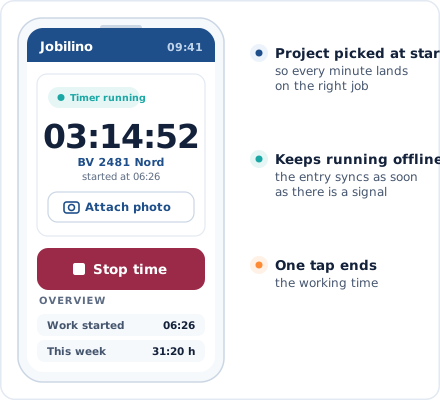
App Time Clock
Start and stop in seconds – with project assignment
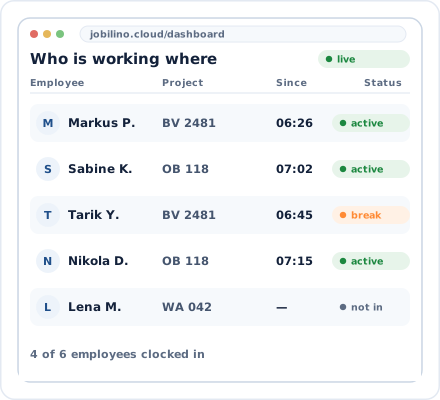
Online Dashboard
Real-time overview of all employees and projects
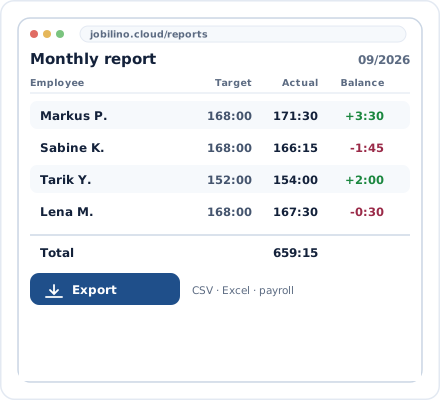
Monthly Evaluation
Ready-Made Reports for Payroll and Billing
Fits into your existing workflows
Jobilino replaces your timesheets and Excel lists – not your entire infrastructure.
CSV and Excel Export
Ready-made hour evaluations and monthly overviews in the format of your payroll accounting
Web and Mobile
Dashboard in the browser, time tracking via app – on any device, without installation
PDF Reports
Project reports and timesheets as PDF for clients, contractors and internal documentation
GDPR-compliant
All data encrypted on European servers – no hosting outside the EU
Online time tracking for your industry
Jobilino is used in industries where employees do not spend the entire day sitting in an office.
Frequently asked questions about online time tracking
What does online time tracking mean?
Does online time tracking work without an internet connection?
Do I need my own server or specialist IT infrastructure?
How quickly is online time tracking ready to use?
Can I evaluate working hours online by project?
Is online time tracking GDPR-compliant?
From how many employees does online time tracking become worthwhile?
Can my employees view their own hours online?
Try Online Time Tracking for Free Now
Register, add employees, get started. Jobilino is set up in just a few minutes – no contract commitment, no credit card, no IT project.
Prefer to call right away? +43 664 5031382