
Time Tracking via NFC for Construction Sites, Properties and Locations
A sticker at the entrance, a phone held against it – done. No scrolling through lists, no typos, no paper. The tag tells the system where the work happens; the app tells it who is doing it.
- One NFC tag per site, project or customer
- Clocking in works without a network connection
- Personal NFC cards possible at the terminal
Time tracking with NFC means an NFC tag is fixed at the place of work, and whoever works there briefly holds their phone against it. Working time starts and stops without anyone searching a list for the right project. It is strongest where the same sites are visited again and again – in cleaning, winter services, property care, on construction sites and in production.
Problems with Time Tracking Without NFC
Choosing the right site is where time tracking fails in everyday use. Someone standing in the rain at half past five in the morning does not scroll through a list of eighty entries – they tap something at random or skip it entirely. An NFC tag removes exactly that friction.
- In a long list of sites the wrong one gets picked – and it only surfaces at billing
- Employees still learning the local language cannot reliably find the right entry
- In a basement, plant room or underground car park there is no signal, so nothing gets clocked at all
- The client wants evidence that somebody really was on site – a list alone does not convince them
The Solution: Time Tracking via NFC
An NFC tag is a passive sticker with no battery and no power supply. It costs little, lasts years and is assigned once to a project or a customer. From then on, holding a phone against it is enough.
You fix an NFC tag at the place of work – at the entrance, on the distribution board door, in the site container or on the equipment. In the administration you assign that tag once to a project or a customer. After that the allocation is settled: whoever touches the tag clocks in on that site without selecting anything.
The division of roles matters. The tag on the wall tells the system where the work happens – it does not identify a person. Who is clocking in follows from who is signed in to the app. One tag can therefore serve a whole crew while everyone still gets their own time entry. The personal NFC card works the other way round: it identifies an employee and is read at a terminal – the classic route for a workshop, a hall or a canteen where not everyone has a company phone. The card UID is only ever stored as a hash.
It keeps working without a network. In a plant room or an underground car park the app stores the entry on the device and submits it once there is a connection again – what gets booked is the actual moment of the tap, not the moment of transmission. The window for this is 72 hours; anything older goes through the normal late entry with a reason.
If you want, further steps follow the check-in: a photo as evidence, a selection of the tasks carried out or – for crews – clocking in several team members at once through the supervisor.
What NFC changes in daily use
No more picking a site
The most common mistake in mobile time tracking is the wrongly selected site. The tag takes the selection out of the process – there is nothing left to confuse.
Language independent
Touching a sticker works without reading. That lowers the barrier for employees still learning the local language – and the app itself comes in 28 languages on top.
Works without a network
Plant rooms, underground car parks and basements are no obstacle. The entry is stored locally and submitted later carrying the actual time.
Evidence for the client
Somebody having touched the tag on site is a different kind of proof from an entry in a list. A photo can be added if you want one.
How NFC time tracking works
-
Fix the tags
One sticker per site, where everybody passes: entrance, container, plant room, equipment. NFC tags need no power and no maintenance.
-
Assign the tag
In the administration you link each tag once to a project or a customer. One chip per customer is intended – if you want to separate several sites of the same customer, create individual projects for them.
-
Sign your team in
Every employee signs in to the app once. That sign-in determines who the time entry belongs to – the tag itself contains no personal data.
-
Clock in on site
Hold the phone against the tag: working time starts. The same again when leaving, and the job is finished and allocated to the site.
The functions at a glance
Tag per project or customer
Every tag is assigned to exactly one project or customer. Unassigned tags are rejected when someone tries to clock in, so no time runs into nothing.
Check in and check out
The same tag starts and ends the job. What happens is decided by the system from the current state – the employee does not switch anything.
A 72-hour offline buffer
Entries stored without a connection are taken over afterwards, carrying their original time. Anything older than 72 hours goes through a late entry.
Personal NFC cards at the terminal
For locations without company phones a personal card identifies the employee at the terminal. The card UID is stored as a hash.
NFC Time Tracking in Everyday Work
Hold the phone against the tag – that is all it takes, and the proof is there.
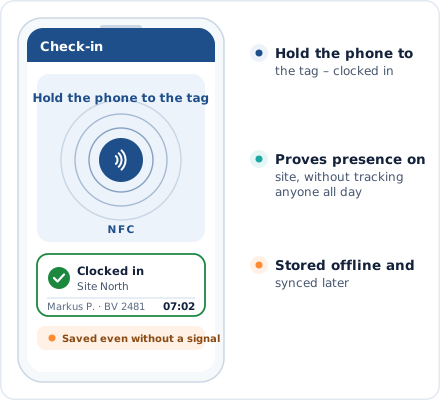
Checking in via NFC
Start or stop working time with a single scan.
Integrations & Compatibility
NFC is not a system of its own but another route into the same time tracking. App, web, terminal and NFC all write into the same data.
App and web
Anyone without a tag to hand clocks in through the app or the browser. Both routes produce the same time entry – you do not have to choose one.
Terminal
At a fixed location a terminal takes over, where employees identify themselves with a personal card. Useful wherever not everyone carries a company phone.
NFC Time Tracking by Industry
NFC pays off wherever the same sites are visited regularly and picking from a list gets in the way of daily work.
Frequently asked questions about time tracking via NFC
What is time tracking via NFC?
Where is NFC time tracking used?
Do you need special devices?
Are times visible in the office immediately?
Introduce NFC time tracking now
Fix the tags, assign them once, get going – setting up a site takes about a minute. No contract term and no credit card.
Prefer to call right away? +43 664 5031382