
Time Tracking via Terminal – Stationary Time Clock for Workshops, Warehouses and Operations
A tablet or fixed device is placed at the entrance. The employee taps their name, selects the project and is clocked in. Breaks and clocking out work the same way. All times are instantly in the system – no timesheets, no app on a personal smartphone, and no need for anyone to be shown how it works.
- One device at the entrance – all employees clock in centrally
- No smartphone required – ideal for workshops, warehouses and production
- Can be combined with app and NFC for mixed teams
Stationary time tracking at the entrance, in the workshop or in the warehouse – for businesses with a fixed location and a large number of employees.
Why paper timesheets don't work on-site
Even in businesses with a fixed location – workshop, warehouse, production floor – paper timesheets fail for the same reasons.
- Timesheets are filled in at the end of the shift rather than when clocking in – start and end times are imprecise
- Sheets pile up in the office, are typed up at the weekend and produce errors when transferred into Excel
- No one knows in real time who is currently in the office and who is not – the attendance overview is only generated retrospectively
- Project hours are estimated as a flat rate because the timesheet has no field for jobs
- Employees without their own smartphone cannot use app-based time tracking – an alternative system is missing
The solution: time tracking via terminal with Jobilino
A tablet or fixed device at the entrance – and every employee clocks in within seconds.
What a clocking terminal brings your business
No smartphone required
Not every employee in the workshop or warehouse has a smartphone – or wants the company app on their personal device. The terminal solves this problem: one device at the entrance is sufficient for everyone.
Real-time attendance
In the dashboard you can see at any time who is in the workplace and who is not. No lists on the whiteboard, no calls to the workshop – the system displays the current status.
Project assignment at the terminal
When clocking in, the employee selects the project or job. Every hour is assigned automatically – the basis for post-calculation and client billing.
Payroll preparation at the touch of a button
Monthly overviews per employee, overtime reports and project evaluations as CSV or Excel. No more manually transcribing timesheets.
Compatible with app and NFC
Terminal in the workshop, app for field staff, NFC tags at the customer's site – all bookings end up in the same system, the same dashboard, the same report.
28 languages at the terminal
Every employee sees the interface in their own language: Albanian, Bulgarian, Croatian, Czech, Danish, Dutch, English, Finnish, French, Georgian, German, Greek, Hungarian, Italian, Latvian, Macedonian, Norwegian, Polish, Portuguese, Romanian, Russian, Serbian, Slovak, Somali, Spanish, Swedish, Turkish and Ukrainian.
How time tracking via terminal works
-
Set up the terminal
Place a tablet or fixed device at the entrance, in the workshop or in the warehouse. Connect it to the Wi-Fi – done. No cabling, no specialist hardware.
-
Employee clocks in
The employee selects their name on the screen, taps Start and chooses the project. Done in seconds – no login, no password, no app.
-
The office sees everything in real time
All entries appear in the dashboard instantly. Who is in? Since when? On which project? Management has a full overview without having to walk to the shop floor.
-
Analyse and export
Monthly summaries, project reports and working-hour evaluations as CSV or Excel – ready-made data for payroll and controlling.
Features of a clocking terminal at a glance
Clock in by selecting your name
The employee taps their name on the screen and is clocked in. No chip, no card, no PIN required – as quick as a tap on a smartphone.
Project assignment at the terminal
When clocking in, the employee selects the project, job order, or cost centre. If they switch projects during the day, they clock over at the terminal.
Breaks and overtime
Breaks are recorded separately and calculated automatically. Overtime and balances are visible to employees and supervisors in the dashboard.
Attendance list in real time
The dashboard shows which employees are currently clocked in – as a digital attendance list that updates automatically.
28 languages at the terminal
The terminal interface adapts to the employee's language. Ideal for businesses with international teams in production, warehousing and workshops.
Compatible with app and NFC
Employees on-site clock in at the terminal, field staff via the app and fixed locations via NFC tag. All entries are recorded in the same system.
Reports and export
Monthly summaries per employee, hour evaluations per project and overtime reports as CSV or Excel. Ready-made data for tax advisors and payroll offices.
Tablet as a Terminal
Any standard Android tablet can be used as a terminal. No special hardware, no expensive time clock – a tablet for under 200 euros is all you need.
The terminal in use
One device on the wall, one overview in the office – for teams that need no phone of their own.
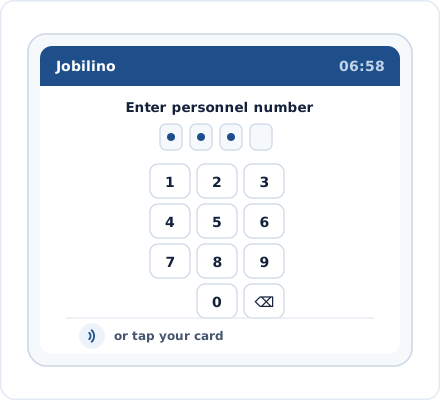
Terminal at the Entrance
Employee selects their name and clocks in
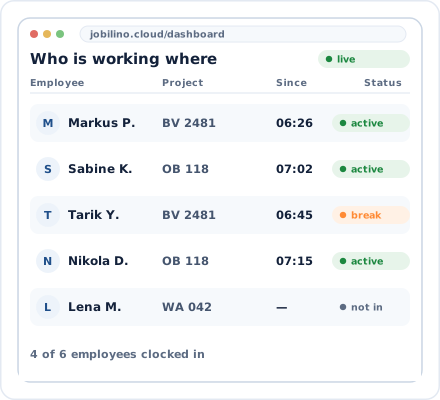
Attendance Overview
Who is in, who is not – in real time
Fits your business
The terminal integrates seamlessly into your existing workflows – as a standalone solution or in combination with the app and NFC.
Terminal + App
Terminal in the workshop, app for field staff – all times in one system
Terminal + NFC
Terminal at the main location, NFC tags at remote sites and client premises
CSV and Excel Export
Ready-made hour evaluations in the format of your payroll accounting
GDPR-compliant
European servers, encrypted data, role-based access rights
Time tracking terminal by industry
The terminal is particularly well suited to businesses with a fixed location and a large number of employees.
Frequently asked questions about time tracking via terminal
Which device do I need as a terminal?
How do employees identify themselves at the terminal?
Can I combine the terminal and the app?
Can employees select a project at the terminal?
In which languages is the terminal available?
Does the terminal work without internet?
How many employees can use one terminal?
How much does time tracking via terminal cost?
Try time tracking via terminal free of charge now
Set up a tablet, add employees, get started. In just a few minutes you have a digital time clock at your entrance – with no contract commitment and no credit card.
Prefer to call right away? +43 664 5031382