
Workforce Management
Workforce management with Jobilino: staff scheduling, dispatch, time tracking and reporting in one system – via app, NFC or terminal. Try it free now.
Workforce management is a cycle, not a single module
Plan, dispatch, record the hours, report – and plan better from what the report says. That is workforce management. It breaks in the same place almost every time: each step lives in a different tool. The rota in a spreadsheet, the arrangements in WhatsApp, the hours on paper slips, the experience in the scheduler's head.
In Jobilino it is one record. A planned shift, a recorded hour and the month-end report all refer to the same project and the same employee – no export, no reconciliation, no transcription errors.

Planning: the rota is on the phone, not on the office wall
A plan pinned up in the office helps nobody on site. In Jobilino you publish the weekly plan and every employee sees their shifts on their phone – in their own language, even without a signal.
The grid imposes no shift pattern: employees in the rows, days in the columns. Early, late, night, split duties, part-time on fixed days. A week that works can be copied onto up to twelve following weeks, and slots that are already taken are skipped.

Dispatch: who drives which vehicle to which client
Between the rota and the start of work sits the question decided every morning at six: which crew goes where, who is at the wheel, which vehicle is free. On the day board you drag available staff onto vehicles and sites.
Anyone on leave or off sick never appears in the pool in the first place. And only someone with the required licence on file can be set as driver – the system checks the qualification, not the scheduler's memory.

Recording: where the work actually happens
Working time is created on the building site, in the cleaning contract and at the client – not at a desk. So there are three ways to capture it: the app on a smartphone, an NFC tag at the site and the terminal as a tablet at the gate.
When clocking in, the employee picks the project or site, so the hour belongs to the right cost centre from the start. Without a signal the booking is stored locally and synchronised later; nothing is lost.

Rules the system knows before they are broken
Eleven hours of rest between two shifts – in Austria under § 12 AZG, in Germany under § 5 ArbZG. In practice the rule breaks at the same place every time: a late shift until 22:00, an early shift at 06:00 the next morning. That is eight hours.
Jobilino flags it while you plan, not at payroll. The same goes for break thresholds, public holidays and overlaps. None of it blocks anything – you decide what to do with it.

Reporting: planned against actual, with no spreadsheet in between
Workforce management gets interesting where planned and actual hours diverge: overtime, the job that ran longer, the project that overruns its costed hours. Because planning and recording are one system, both figures sit side by side.
Every booking carries the time, the place, the person and a log of any later change. That is the difference between a number somebody remembers and a number that can be evidenced – to payroll as much as to the client.

One team, many languages
In construction, cleaning and security work, rarely does everyone share a language. Software that can only be operated in German produces exactly the queries and mis-bookings it was meant to remove.
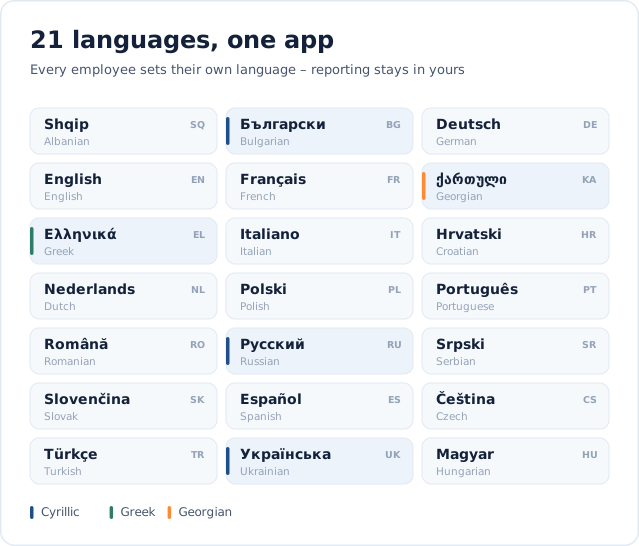
The Jobilino app speaks more than 30 languages and each employee sets their own. Clock in, choose the site, clock out – that works without training and without a translator on the crew.
How to introduce workforce management
Ready in 3 steps
-
Add and invite employees – by e-mail or simply by mobile number
-
Choose how hours are captured: app on the phone, NFC tag on site or terminal at the entrance
-
Plan, clock in, report – in one system from day one instead of five
Workforce management without an enterprise project
Large workforce management platforms can do almost everything – and need consulting days, an internal project owner and usually several months to do it. For a business with 15 or 80 people working outside, that is the wrong order of magnitude.
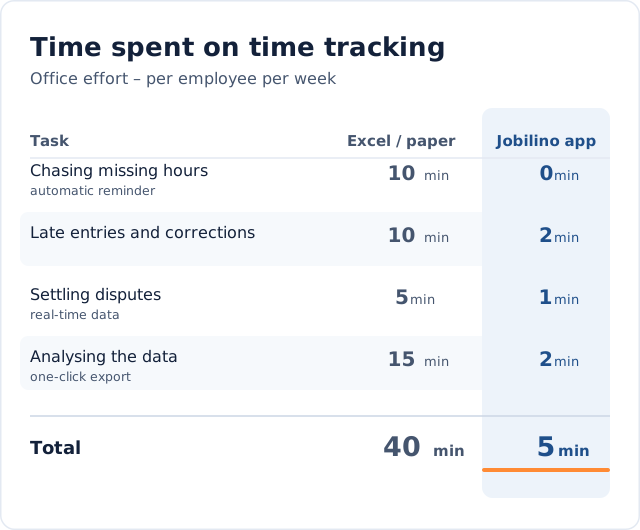
Jobilino covers the operational core: plan, dispatch, record, report. Office effort per employee drops from around 40 minutes a week with paper and spreadsheets to about 5 minutes. Set up in under 30 minutes, billed per active employee, cancellable monthly.
One system instead of five
Planning, time and reporting
Rota, dispatch, time tracking, leave and reporting work together. No export, no reconciliation, no second version of the truth in a spreadsheet.
For teams without a desk
App, NFC and terminal
Clocking in happens on the employee's own phone, at an NFC tag on site or at a tablet in the depot. Offline too, and without a company handset.
Ready in an afternoon
No IT project
Register, invite employees, hand out the app. Nothing to install on site, no training, no minimum contract term.
What workforce management changes in practice
It is not the number of features that decides, but whether the data is created where the work happens. Once it is, four jobs disappear from the office week that never belonged there.
No hunting for paper slips
The hours are already in the system when the month ends. Nobody collects slips and nobody types them up.
Less idle time and fewer double bookings
On the day board it is obvious where two people are standing and where nobody is – before the day has started.
Evidence rather than recollection
Time, place, person and every change are logged. In an inspection what counts is the record, not the account.
Figures you can rely on per project and client
Because every hour is assigned at clock-in, you know which job carries itself – and which merely keeps people busy.
Frequently asked questions
What is workforce management?
How does workforce management differ from plain time tracking?
Is workforce management software worth it for small businesses too?
Does workforce management work without an internet connection?
How long does it take to introduce workforce management software?
Is the workforce management solution GDPR-compliant?
Can I also manage jobs and plan assignments with AI in Jobilino?
Try workforce management free now
Register, add your employees, hand out the app – and from tomorrow planning, time tracking and reporting run in one system. No credit card and no minimum contract term.
Prefer to call right away? +43 664 5031382