
Multilingual Time Tracking: More Than 30 Languages in One App
Do your people speak Polish, Romanian, Turkish or Ukrainian? With Jobilino, every employee records their working hours in their native language – no training sessions, no interpreter calls, and no hours that don't add up at the end of the month.
- More than 30 languages – set per employee, not per company
- Reports, timesheets and payroll exports stay in your language
- Cyrillic, Greek and Georgian scripts included
- No surcharge, no per-language licence
Multilingual time tracking does not simply mean an app that happens to support English. It means every individual employee uses the app in the language they think in – while management still receives everything in the language they need. This page explains why time tracking so often breaks down due to language barriers and how Jobilino solves this with more than 30 languages.
Why Time Tracking Breaks Down at the Language Barrier
On construction sites, in cleaning services, in care and in logistics, teams from across the globe work side by side. Yet time-tracking tools are almost always available in only one language. The result looks the same in every organisation:
- The foreman clocks in for half his crew and estimates the times – out of helpfulness, not carelessness.
- People tap and hope, because they cannot reliably tell “break” from “site” from “absence”.
- Wrong entries only surface in payroll – by then nobody remembers how the day actually went.
- Every rollout costs twice: once for the training, once for the colleague translating on the side.
- People who do not understand the app work around it. Then the paper slip is back on the dashboard.
- And in an audit, the one record you now need is the one that is missing.
How Jobilino Solves Multilingual Time Tracking
The language setting belongs to the employee, not the organisation. Each person sets their language once – and from that point on, they see the entire app in their native language.
In most time tracking apps the language is a company setting: the business picks one, and all forty employees get it. In Jobilino the language is a property of the individual employee. The Croatian site supervisor works in Croatian, their Romanian colleague in Romanian, the Ukrainian cleaning operative in Ukrainian – in the same app, within the same organisation, on the same day.
Currently available in More than 30 languages: Albanian, Bosnian, Bulgarian, Croatian, Czech, Danish, Dutch, English, Finnish, French, Georgian, German, Greek, Hungarian, Italian, Latvian, Lithuanian, Macedonian, Norwegian, Polish, Portuguese, Romanian, Russian, Serbian, Slovak, Slovenian, Somali, Spanish, Swedish, Turkish and Ukrainian. Cyrillic scripts (Bulgarian, Russian, Ukrainian), the Greek alphabet and the Georgian script are all rendered as cleanly as Latin special characters – Serbian is shipped in Latin script, which is the more common everyday choice in the region.
Nothing changes for management: reports, timesheets, exports and payroll preparation stay in your own language. Translation happens only where it is needed – on the employee's phone.
All languages of the employee app at a glance
Each language appears here the way the employee sees it in the app – in its own script, not as a Latin transliteration. The list grows with the app, and every language is included in every plan.
- Albanisch Shqip Gastro, Bau, Reinigung SQ
- Bosnisch Bosanski Bau, Gastro, Reinigung BS
- Bulgarisch Български Reinigung, Pflege · Kyrillisch BG
- Dänisch Dansk Skandinavien · Logistik, Industrie DA
- Deutsch Deutsch Standard · DE / AT / CH DE
- Englisch English International EN
- Finnisch Suomi Nordeuropa · Industrie, Logistik FI
- Französisch Français Gastro, Bau · CH FR
- Georgisch ქართული Bau, Logistik · Eigene Schrift KA
- Griechisch Ελληνικά Gastro, Reinigung · Griechische Schrift EL
- Italienisch Italiano Südtirol, Schweiz, Gastro IT
- Kroatisch Hrvatski Bau, Pflege, Gastro HR
- Lettisch Latviešu Baltikum · Bau, Logistik LV
- Litauisch Lietuvių Baltikum · Bau, Logistik LT
- Mazedonisch Македонски Bau, Gastro, Reinigung · Kyrillisch MK
- Niederländisch Nederlands Logistik, Bau NL
- Norwegisch Norsk bokmål Skandinavien · Bau, Industrie NB
- Polnisch Polski Bau, Reinigung, Pflege PL
- Portugiesisch Português Bau, Gastro, Reinigung PT
- Rumänisch Română Bau, Landwirtschaft, Logistik RO
- Russisch Русский Bau, Reinigung, Logistik · Kyrillisch RU
- Schwedisch Svenska Skandinavien · Industrie, Logistik SV
- Serbisch Srpski Bau, Logistik · Latein / Kyrillisch SR
- Slowakisch Slovenčina Industrie, Logistik, Pflege SK
- Slowenisch Slovenščina Industrie, Logistik, Gastro SL
- Somali Soomaali Logistik, Reinigung, Pflege SO
- Spanisch Español Gastro, Bau, Landwirtschaft ES
- Tschechisch Čeština Industrie, Gastro, Logistik CS
- Türkisch Türkçe Gastro, Reinigung, Handwerk TR
- Ukrainisch Українська Bau, Pflege, Logistik · Kyrillisch UK
- Ungarisch Magyar Logistik, Industrie HU
What Multilingual Time Tracking Delivers in Practice
Fewer calls to the office
Someone using the app in their own language does not need to ring up and ask which button is the right one. The office receives hours instead of questions.
Fewer payroll corrections
Most wrong entries come from uncertainty, not intent. Remove the language barrier and most of the correction loops go with it.
New colleagues start the same day
No training session, no colleague translating on the side: install the app, pick a language, clock in. That matters most where staff turns over seasonally.
Records that hold up under scrutiny
Hours recorded by the employee themselves carry more weight than hours somebody else estimated for them – in an audit as much as in a dispute with a client.
One app for mixed crews
Croatian foreman, Romanian colleague, Ukrainian cleaner: all in the same system, each in their own language. You still manage one company, not five language groups.
At no extra cost
The languages are part of the product, not an add-on module. There are no language packs to unlock separately.
Four Steps to Multilingual Time Tracking
-
Set up your company
You register and create your company. You run administration in the language you work in – that language stays yours throughout.
-
Invite your employees
Invite people by email, SMS or QR code. Anyone without their own email address joins via a phone number or the company setup link.
-
Pick a language
On first launch each person picks their language – once, on their own phone. From then on the app appears entirely in that language, regardless of what colleagues have chosen.
-
Clock in, review, run payroll
Employees record their hours in their language. In the office the same data comes together in yours – as timesheets, project reports and a finished payroll export.
Features That Work in Every Language
Language belongs to the person, not the company
The language setting lives on the user account. Twenty employees can use twenty different languages without anyone switching anything.
Push messages in the recipient's language
Reminders, approvals and warnings arrive in the language the recipient has set – not the language of whoever triggered them.
Works offline on site
With no signal, entries are stored locally and synced later. Language changes nothing about that: what works offline works offline in every language.
An NFC tag needs no language at all
On site the employee holds their phone to the tag – done. For crews with little reading practice this is the lowest barrier there is.
Terminal for crews without smartphones
A wall terminal lets employees without their own device clock in too. The interface follows the same logic as the app.
Reporting stays in your language
Reports, exports and payroll preparation appear in the language of administration. Translation happens where it is needed – on the employee's phone.
What the app looks like for your employees
Real screens of the employee app with the original labels of each language version – exactly as the employee sees them on their phone.
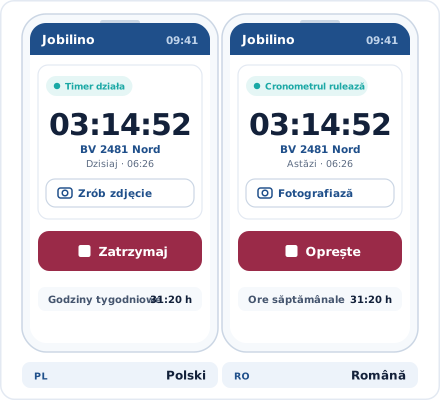
Polish and Romanian: the same time clock, two languages
“Timer działa” and “Zatrzymaj” on the left, “Cronometrul rulează” and “Oprește” on the right – everyone sees the same screen in their own language. Only the project name stays exactly as you created it.
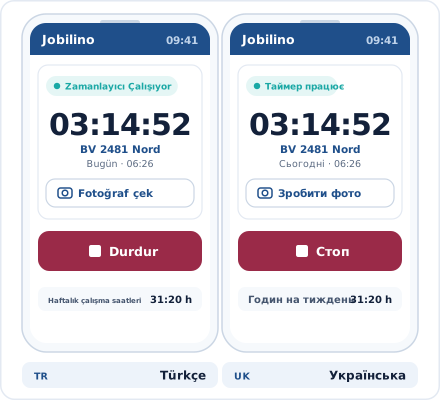
Turkish and Ukrainian: Latin and Cyrillic script
“Zamanlayıcı Çalışıyor” next to “Таймер працює”: the app shows every language in its own script – no transliteration, no placeholders, not even in push notifications.
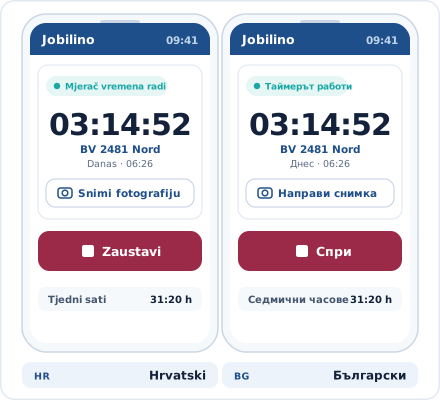
Croatian and Bulgarian: buttons everyone reads with confidence
“Zaustavi” and “Спри” are unambiguous – anyone who understands the button will press it. Error messages and reminders arrive in the same language.
Callback
What would this look like in your business?
A quick call: we look at your processes around “Multilingual Time Tracking” with you and tell you honestly whether and how Jobilino fits.
- We call you back – free & no obligation
- Reply within one business day · No sharing with third parties
Prefer to call right away? +43 664 5031382
More Than Translated Button Labels
Many providers translate their interface labels and call that multilingual. What truly matters is what happens when something goes wrong:
Error messages
When an entry is rejected, the employee has to understand why. So the message appears in their language – not as foreign text inside an otherwise translated app.
Reminders and notifications
A forgotten clock-out, an approved request, a changed assignment: every message is generated in the recipient's language, including as a push notification.
Leave and absence requests
The employee files a request in their language, the manager sees it in theirs. Both are discussing the same record, with nobody translating.
Break and rest-period warnings
A warning about break rules or rest periods is only worth anything if it is read and understood. Those appear in the employee's language too.
Multilingual Time Tracking by Industry
Wherever teams from different countries work together, the language used determines whether time tracking is actually adopted – or quietly worked around.
Frequently Asked Questions About Multilingual Time Tracking
How many languages is the Jobilino time tracking app available in?
Can different employees use different languages at the same time?
Does the management interface stay in the administration language?
Who sets the language – the organisation or the employee?
Are Cyrillic and Greek scripts displayed correctly?
Does multilingual time tracking cost extra?
What happens if a translation is missing for a particular term?
Does multilingual time tracking help with working-time recording obligations?
Is the time tracking also available in Polish?
Is the time tracking also available in Romanian?
Is the time tracking also available in Turkish?
Is the time tracking also available in Ukrainian?
Is the app available in Croatian, Bosnian and Serbian?
Can I try the app in my employees' language before deciding?
Does each language require its own app?
Can we request additional languages?
Try Multilingual Time Tracking for Free
Sign up, distribute the app, choose a language – your employees can start clocking in tomorrow in their own language. More than 30 languages, one app, no language barriers. No credit card required and no long-term contract.
Prefer to call right away? +43 664 5031382