
A mileage log that fills itself in while you drive
The driver starts the trip in the app and ends it on arrival. Distance, trip type and purpose land in the log straight away – with an odometer photo, a change log and an export for your tax adviser.
- Start and stop the trip in the app, even without a signal
- Business, private or commute – separated per trip
- Every later change stays visible
- Export as Excel, CSV and PDF
- Runs on
- App on the road, reports on the web
- Plan
- Included in Premium, add-on for Basic
- Works with
- Time tracking, vehicles, reports
- Typical for
- Service technicians, field staff, trades
A mileage log counts when it is complete, kept promptly and cannot be rewritten at will. Jobilino keeps it where the trip happens: in the vehicle, in the app – and in the same system as the working hours.
Three trip types, three different requirements
A day in the life of a service technician with the company van. Every trip gets a type – and each type needs something different.
- Date and odometer at start and end
- Destination with address
- Purpose of the trip
- Client or business partner visited
- Distance driven
- No destination or purpose needed
- Distance driven
- A short note
Which method pays off for tax depends on your country and your adviser. Jobilino makes sure the log is complete.
What a mileage log has to get right
Promptly, not at month end
A mileage log has to be kept promptly. Reconstructed from memory at the end of the month, it is open to challenge. Recording at the moment of the trip solves exactly that – it takes seconds and happens where the trip is.
Complete, not sampled
Missing trips are the most common reason a mileage log is rejected. If recording starts and stops like a clock-in, there are no gaps at the end of the month that nobody can reconstruct any more.
Verifiable, not asserted
What matters is not that nothing was changed, but that every change can be traced. That is what the log provides: the original value, the person who changed it and the timestamp.
Connected to time tracking
Trips and working hours live in the same system. A trip can reference the job during which it took place – for reporting per customer that is the difference between two lists and one picture.
From number plate to monthly export
-
Add vehicles
Enter the plate and assign the vehicle to specific drivers – or open it to everyone.
-
Start the trip
The driver starts the trip in the app. The route is only recorded while the trip is running.
-
Add type and purpose
Business, private or commute; for business trips destination, purpose and client. A photo of the odometer if you want one.
-
Export the month
Excel, CSV or PDF for your tax adviser – Excel and PDF with a separate part listing every change.
What’s included
On the road
- Start and stop a trip in the app, even without a signal
- Route recorded only while the trip is running
- Odometer entered by hand or taken from the recorded route
- Photo of the odometer at start and end
Order
- Three trip types: business, private, commute
- Assign vehicles to specific drivers
- Reminders for upcoming inspections
- Add trips on the web afterwards
Evidence
- Change log per trip: who, when, which value
- Export as Excel, CSV and PDF
- Excel and PDF with a separate part for every change
- Trips and working hours in one system
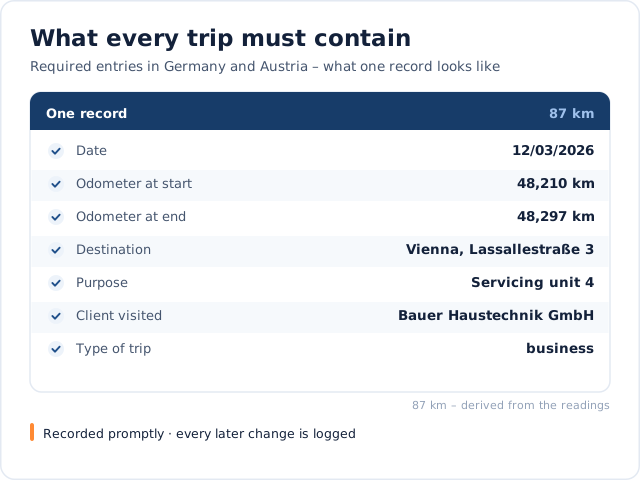
What a trip looks like in the log
Two views: the entry with everything a business trip needs – and why it is created at the moment of the trip.

One entry, every required detail
Date, odometer at start and end, destination, purpose and the client visited – plus the trip type, which decides what is needed.

Recorded at the moment of the trip
Started and stopped like a clock-in, even without a signal. A later correction stays visible with the old value, the person and the time.
Demo
What would this look like in your business?
In a short demo we look at your processes around “Digital Mileage Log – Record & Manage Trips with Ease” with you and tell you honestly whether and how Jobilino fits.
- Personal demo – free & no obligation
- Reply within one business day · No sharing with third parties
Prefer to call right away? +43 664 5031382
Who drives a lot
Businesses whose work happens at the client’s site and whose vehicles are on the road all day.
What makes a mileage log stand up
A mileage log is not accepted because it exists, but because it was kept completely, promptly and in closed form. Every single trip needs the date, the odometer reading at start and end, the destination with address, the purpose and the business partner visited. Detours are noted separately.
Private trips need only the distance, journeys between home and work a short note. That split into three trip types is missing from almost every spreadsheet – there, all that remains at the end is a total.
Flat rate or mileage log
When a company car is also used privately, most countries tax the private use as a benefit – often either as a flat rate or on the basis of a mileage log that shows the actual business and private kilometres. The flat rate is convenient, but it can be expensive when the private share is small, as with a service technician whose van is almost entirely used for work.
Which method applies and pays off depends on your country and is for your tax adviser to judge; this page is not tax advice. What Jobilino handles is the part that usually fails: keeping the log complete and without gaps.
GPS, data protection and works councils
Employee location data is personal data. Jobilino therefore records the route only during a trip that is running – the employee starts and stops it. Outside that window there is no positioning; there is no continuous tracking in the background.
Records are held on EU servers, access is role-based, and photos attached to a trip are reachable only through the application, not publicly on the web. Where a works council exists, introducing the system requires its agreement – plan that step in rather than catching up on it later.
Pool vehicles and changing drivers
With one vehicle and one fixed driver, attribution is easy. It gets interesting with a pool vehicle shared by three crews: then every trip has to show who drove – otherwise neither the taxable benefit nor a damage claim can be assigned.
In Jobilino every trip belongs to the signed-in driver. A vehicle can be assigned to specific people; without an assignment it stays open to everyone. Nobody books onto another crew's van by accident, and the system flags upcoming inspections in good time.
Questions about the mileage log
Does digital time tracking help with billing?
Does online time tracking work without an internet connection?
Does Jobilino also offer shift scheduling?
Which device do I need as a terminal?
Are my employees tracked continuously?
When does a mileage log stand up?
Can I correct a trip afterwards?
One trip, recorded live
In the demo we start a trip in the app, give it a trip type and export the month together with the change log.
Prefer to call right away? +43 664 5031382