
Keep your construction log digitally – every site day documented as evidence
Foremen and site managers write the daily report right on site in the app: weather, crew, work performed, obstructions and photos. Jobilino suggests personnel, equipment and material from your own time tracking, scheduling and warehouse withdrawals. Closing the day freezes the report as a PDF – with version history, verification code and plausibility check.
- Daily report on site in the app instead of from memory in the evening
- Closing the day archives the PDF – every correction stays visible as its own version
- Obstruction notice under VOB/B § 6 straight from the daily report
A construction log is the continuous, day-by-day documentation of what happens on a site: who worked, what was built, what the weather was like, which equipment and materials were used and what disrupted the schedule. It is the single most important piece of evidence in claims, extensions of time and defect disputes. Jobilino keeps the construction log where it is created – on site, in the app, connected to time tracking, dispatch planning and the warehouse.
Why the construction log usually fails when it matters
Almost every construction company keeps a log – on paper, in Word or in an Excel template. The problem only shows two years later, when the client disputes an obstruction and the record fails to convince at exactly that moment.
- The report is written on Friday from memory – and reads in court as a reconstruction, not as documentation
- A Word or Excel file can be changed at any time without anyone seeing that it was changed
- Obstructions end up as a side note in the remarks instead of as a formal notice on the client’s desk
- The hours in the report do not match the hours in time tracking – and nobody notices in time
- Paper sheets sit in the site container, in a van, or cannot be found at all when they are needed
- Rain days and stoppages are not recorded at all – and the gap in the log later looks like negligence
The solution: a construction log built from your own site data
Jobilino assembles the daily report from what the company records anyway – and the close-out turns it into a document whose changes remain fully traceable.
The construction log in Jobilino is a collection of daily site reports – one per site and calendar day. It is recorded on site in the employee app or at the desk: weather with temperature and precipitation, start and end of work, the crew deployed, the work performed and everything that disrupted the schedule. Entries are structured into ten fixed kinds – from material and equipment through daywork and inspections to obstructions, interruptions, defects and special incidents.
Jobilino takes on most of the legwork: crew from time tracking on the construction site and from dispatch planning, equipment from trips and shifts, material from that day’s warehouse withdrawals – all as suggestions the site manager reviews and adopts. The report always remains their statement: the system suggests, it never asserts.
Before the close, a plausibility check compares the report against that day’s operational data and flags discrepancies – people who clocked in but are missing from the report, diverging hours, or material withdrawals nobody entered. Closing the day then freezes the report as an archived PDF. If it is corrected later, a new version is created with a mandatory reason; the previous one is kept and the new document itself states which version it replaces. That traceability is exactly what separates a digital construction log from a file on a server.
Where the VOB/B is agreed in your construction contract, a documented obstruction becomes a formal notice under § 6 para. 1 VOB/B in one click – consecutively numbered, referring to the daily report as evidence, with text frozen at the moment of issue. Sending it and proving receipt remain with you. You hand out the month as a PDF or Excel file, and an individual day optionally through a time-limited link the client confirms by name. All data is stored GDPR-compliant on servers in the EU, and the construction log is part of the same platform as time tracking, scheduling and inventory – one login, one project master, no second piece of software.
What a digital construction log delivers
Timeliness instead of reconstruction
The report is written on the construction day, on site. Timeliness is the criterion the evidential weight of a construction log hangs on – a report written three weeks later is treated by the other side as a reconstruction.
Changes stay visible
A closed report cannot be overwritten. Corrections create a new PDF version with a mandatory reason – the previous version remains readable.
Claims are not lost
An obstruction in the daily report becomes a formal notice immediately. Issuing it without delay secures your extension of time and damages – failing to do so forfeits both.
Less effort than paper
Personnel, equipment and material arrive as suggestions from time tracking, scheduling and the warehouse. The site manager reviews and adds instead of starting from scratch every day.
Contradictions surface at once
The plausibility check compares report and time tracking before the day is closed – not when an expert witness finally lays both side by side.
Evidence years later
Daily reports, photos and archived PDFs are never deleted automatically. They remain available after the defects liability period expires – which is exactly when they are needed.
How the construction log works with Jobilino
-
Switch the log on per site
One switch in the project settings activates the construction log for that site. Three separate permissions control who may keep it, view it and reopen closed reports.
-
Record the day on site
The foreman opens the app, picks the site and enters weather, working hours, crew, work performed and photos – adopting suggestions from time tracking, scheduling and the warehouse in one click.
-
Check and close the day
The plausibility check reports discrepancies against operational data. Closing the day makes the report immutable and archives it as a PDF with a version number.
-
Countersign and secure claims
Site management countersigns the report. Documented obstructions become a numbered obstruction notice under VOB/B § 6 as a document in its own right.
-
Hand out the month
Export the period as PDF or Excel – only closed days are exported. Individual reports are shared with the client through a time-limited link.
Construction log features at a glance
One report per site and day
Every daily report belongs to exactly one project and one calendar day. Duplicate reports for the same day and reports dated in the future are ruled out.
Ten fixed entry kinds
Work performed, material, equipment and machinery, daywork, inspections and acceptances, obstructions, interruptions, defects, instructions and special incidents.
Weather and working hours
Weather condition, min/max temperature, precipitation note plus start and end of work – the entries that matter in a claim for an extension of time.
Own crew and outside firms
Your own employees by name with hours, subcontractors as a gang with company name, trade and headcount – cleanly separated instead of lumped into one row.
Suggestions from live operations
Crew from time tracking and dispatch planning, equipment from trips and shifts, material from that day’s warehouse withdrawals – adopted group by group.
Photos of progress
Images belong to the day and travel into the archived PDF. Photos taken in the app are marked as camera captures.
Plausibility check
Compares the report against time tracking, scheduling and the warehouse: missing or additional people, diverging hours, clock-ins outside the stated working window, unrecorded material withdrawals and equipment.
Close-out with PDF archive
The close archives the PDF with a version number. Every later download returns exactly that file – two printouts of the same version are guaranteed identical.
Reopening with a reason
Corrections are possible but never invisible: reopening requires a reason, is logged, and the next close produces a new version.
Countersigning by site management
The closed report is countersigned internally as a second pair of eyes – with name and timestamp on the document.
Obstruction notice under VOB/B § 6
An obstruction or interruption entry becomes a numbered letter with cause, effect and a reference to the daily report. The text is frozen at issue.
Document non-working days
Weather stoppages or site closures are recorded as such. A documented rain day is an argument – a gap in the log is not.
Automatic evening draft
In the evening Jobilino prepares a draft from recorded data for every site with activity – visibly marked as unreviewed and never closed automatically.
Reminder for missing days
If work was done but no report was closed, Jobilino notifies those responsible – in the system and as a push, once per day and site.
Monthly export as PDF and Excel
The period as a coherent construction log. Only closed reports are exported – a reliable month-end check.
Client link with acknowledgement
A time-limited link the client opens without signing in and confirms by name. A new link invalidates the old one immediately.
Verification code and document hash
Every closed report carries a verification code and its SHA-256 hash. Recipients check without signing in whether their copy matches the original – and whether a newer version exists.
Three separate permissions
Keeping, viewing and reopening are granted individually. The foreman writes, commercial management reads along, and only a few may change a closed report.
Two things that separate a site diary from a file
Closing the day turns a report into a document – and most of the entries come from data your business already records.

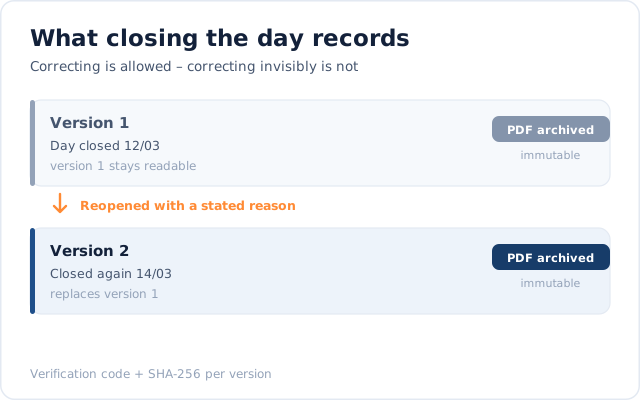
Correcting is allowed, correcting invisibly is not
Closing the day archives the report as a PDF and makes it immutable. A later correction requires a stated reason and creates a new version that names the one it replaces – the old version stays readable. Every version carries a verification code and its SHA-256 hash, so a recipient can check without signing in whether their copy matches the original.

The report largely builds itself
Personnel comes from time tracking, plant from trips and shifts, materials from that day's warehouse withdrawals – each as a proposal the site manager reviews. Weather, work carried out, obstructions and photos are entered by them. The system proposes; it never asserts. The report stays their statement.
Callback
What would this look like in your business?
A quick call: we look at your processes around “Construction Log” with you and tell you honestly whether and how Jobilino fits.
- We call you back – free & no obligation
- Reply within one business day · No sharing with third parties
Prefer to call right away? +43 664 5031382
The construction log in context
The construction log does not stand alone – it reads the data your site produces anyway, and writes back into none of those systems.
Time tracking
Clocked hours and crew size are adopted as a personnel suggestion and checked against the report at close. Time tracking remains authoritative for payroll and invoicing.
Scheduling and dispatch
The planned crew and the assigned vehicles are available as suggestions – even before anyone has clocked in.
Warehouse
Material withdrawals for this site are suggested with quantity and unit. If a withdrawal is missing from the report, the plausibility check points it out.
Mileage tracker and fleet
Vehicles and machines that were on site that day can be adopted as equipment entries.
Employee app
Pick the site, record the day, take photos, close the day – right where the work happens. Corrections to closed reports are deliberately reserved for the web interface.
Notifications
Prepared draft, missing daily report: Jobilino gets in touch in the system and by push – with those responsible, not with everyone.
Construction log by industry
A digital construction log has the biggest effect where several sites run in parallel and claims, obstructions and construction periods have to be proven regularly.
Frequently asked questions about the construction log
What is a construction log?
Is a construction log mandatory?
What belongs in a construction log?
Who keeps the construction log?
What is the difference between a construction log and a daily site report?
Is a digital construction log suitable as evidence?
Can I create an obstruction notice under VOB/B from the construction log?
Does the construction log work on sites without reception?
Can the client view and confirm the daily site report?
How long does a construction log have to be kept?
Do we need separate software for the construction log?
Start keeping your construction log digitally tomorrow
Pick a site, set the switch, record the first day – without an implementation project and without a second piece of software. Try it free and close your first daily report today.
Prefer to call right away? +43 664 5031382