
Staff scheduling that tells you where someone is still missing
You record how many people each site needs and when. Jobilino shows the open slots, suggests a name for each one with its reasons and checks qualifications and client rules. New: book jobs straight into the plan, and simply ask Joby, the AI assistant, who can cover on Tuesday.
- Required headcount per site – open slots surface by themselves
- Planning assistant with explained suggestions based on fixed rules
- New: AI assistant Joby – ask about the plan in plain language, processed in the EU
- New: book jobs, one-off or recurring, right on the board
- Runs on
- Planning on the web, shifts in the app
- Plan
- Included in Premium
- Works with
- Time tracking, leave, jobs, dispatch
- Typical for
- Commercial cleaning, security, facility management
In Jobilino, staff scheduling means: who works on which day, in which time window, at which site – and on what task. It is more than a shift grid, because the place of work is planned along with it, and it is something other than dispatch, because no vehicles are allocated. Planning and time tracking stay separate records: planned is not worked.
The plan shows its own gap
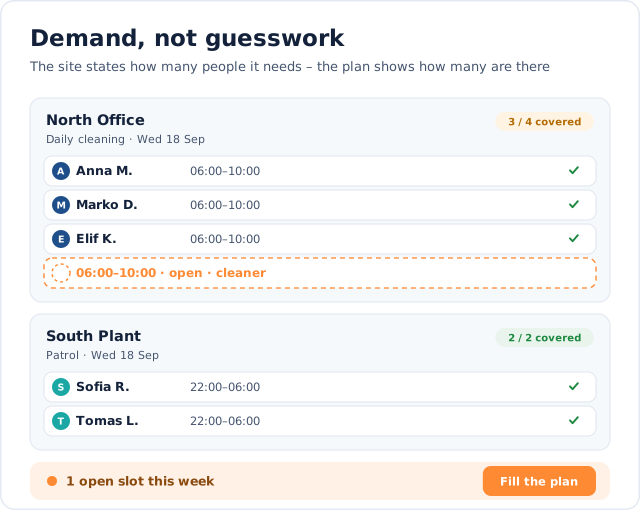
A Tuesday at a cleaning company: because the demand per site is on file, the missing shift stands out before the client calls.
“Fill plan” suggests a person for the open slot and gives the reason – you accept or discard it.
Why building next week's plan takes all of Friday afternoon
Not because entering it is hard. Because the facts you need for it sit in six different places:
- Who is on leave or off sick sits in the absence list – not in the plan.
- Which sites need how many people lives only in the planner's head.
- Which qualification a client requires is buried in a contract or an e-mail.
- Who already has a lot of hours this week only shows up in payroll.
- New jobs come in by phone and end up on a note instead of in the plan.
- Who could stand in for whom takes a round of phone calls.
How Jobilino plans: demand, suggestion, control
Demand, suggestion, control – plus jobs that land straight in the plan and an AI assistant that answers your questions. Every rule lives on the server, not in the interface.
It starts with demand. For each site you record how many people are needed on which weekdays and in which time window – optionally with the qualification the client requires and the matching assignment template. For the first time the system knows what a complete plan looks like. A site with nobody scheduled now stands out; before, it was simply, unremarkably empty.
From that come the open slots. The day view shows “3 of 4 filled” per site and a dashed row for the missing assignment – clickable, and the drop target for the person you drag onto it. Open slots are not records of their own: they are derived from demand and actual assignments, so a slot counts as filled as soon as an assignment covers the demand in time. Week and month count the same numbers.
The planning assistant does the rest. “Fill plan” looks for the right person for every open slot – first as a preview you accept or discard row by row. Every suggestion states its reasons: knows the site, qualification valid, still has room this week, rarely worked weekends lately. Anyone who does not qualify appears with exactly that reason – leave, overlap, missing qualification, client exclusion, daily or weekly working-time limit. The suggestions follow fixed rules: the same starting situation produces the same suggestion, and every one can be explained.
New work enters the plan as a job. While the client is still on the phone you pick the client and site, decide whether the job is one-off or recurs every one to eight weeks, and choose who does it – or leave it as an open slot. The visits are ordinary assignments on the board, staff get a push notification, and on site they complete the visit with photos and the client's signature. More under job management.
And if you would rather ask than search: Joby, the AI assistant in staff scheduling, understands questions in plain language – “Who could cover for Anna on Tuesday without going into overtime?” – and answers with suggestions you check with one click. A sentence like “Schedule Anna and Ben Mon–Fri 06:00–14:00 at the Station site for 4 weeks” becomes a prefilled form. Joby never changes the plan itself: you confirm every suggestion, and the AI processing takes place in the EU. More under AI staff scheduling.
And all of it is checked on the server, not in the interface. An absent person, a person blocked for this client and a missing qualification the client requires are hard limits: the assignment cannot be created, and the reason is given – when creating as well as when moving, copying, repeating, auto-filling and for every suggestion Joby makes. Rest periods, the daily working-time limit, contracted weekly hours and public holidays are notices instead: they speak up while you plan but do not block. The decision stays with you.
What staff scheduling changes day to day
Gaps show up before the client calls
Because demand is recorded per site, the plan itself shows where someone is missing – not Monday's complaint.
The weekly plan in minutes, not an afternoon
“Fill plan” suggests a person for every open slot. You accept what fits and change the rest by hand.
Answers instead of searching
Ask Joby who can stand in or which sites are short-staffed next week – the answer comes with its reasons and a button to apply it.
From phone call to assignment without paper
A new job is booked on one screen, appears on the board immediately and reaches staff as a push notification.
Client rules are kept
Required qualifications and blocked employees are hard limits – for automatic suggestions and for the AI assistant too.
Planned is not worked
Clocked hours remain a separate record. You can always see whether plan and reality match.
Five steps to a finished weekly plan
-
Set up sites and demand
For each site you record weekdays, time window, headcount and, if needed, the required qualification.
-
Book jobs
Create new client jobs as one-off or recurring – with fixed staff or as an open slot.
-
Let the plan fill or ask Joby
The planning assistant suggests a person for every open slot. Joby answers questions about the plan and builds plans from a sentence.
-
Review and accept
You accept suggestions row by row. Every rule runs again on saving – on the server.
-
Publish
Staff see their assignments in the app under “My shifts”, with a push notification and in their own language.
What’s included
Demand
- Headcount, weekdays and time window per site
- Required qualification per site or client
- Open slots on the board: “3/4 filled”
- Shift templates for early, night and routine cleaning
Staffing
- “Fill plan”: one suggestion per open slot, with its reasons
- Drag and drop for day, week and month
- “Like last week”: copy a period, filled slots are skipped
- A sick note flags the shifts affected and suggests stand-ins
Check and publish
- Absence, client exclusion and missing qualification cannot be scheduled
- Warnings for rest periods, working-time limits and contracted hours
- Publish the week: a push notification to every employee
- PDF notice for the wall, Excel and CSV export
What staff scheduling looks like
Two views explain the difference from an ordinary shift grid: the board that knows its own gap – and the suggestion that states its reasons.

The board knows its own gap
“3 of 4 filled” per site and a dashed row for the missing assignment – the target for the next person you drag onto it.

The suggestion states its reasons
Knows the site, qualification valid, still has room – and anyone ruled out appears with exactly that reason.
Demo
What would this look like in your business?
In a short demo we look at your processes around “Staff Scheduling” with you and tell you honestly whether and how Jobilino fits.
- Personal demo – free & no obligation
- Reply within one business day · No sharing with third parties
Prefer to call right away? +43 664 5031382
Connected to what you already use
Staff scheduling is not an island but another view of the same master data:
Time tracking
Planned assignments and clocked hours run on the same sites. A clock-in without a project lands on the planned site, and the planned-versus-actual comparison builds itself.
Leave and sickness
Approved absences block assignment automatically; sick notes trigger the search for cover.
Dispatch
Vehicles and car pools share the same assignments as the weekly plan.
Invoices
Completed visits with a price are taken over as invoice lines – one line per visit.
Employee app
“My shifts” with push notifications, visit completion with photos and the client's signature.
Where staff scheduling is needed
Wherever the work happens on site rather than at a desk:
Frequently asked questions about staff scheduling
What is the difference between staff scheduling and shift planning?
How does staff scheduling differ from dispatch?
How does the planning assistant decide who to suggest?
Does Jobilino schedule automatically without me seeing it?
What happens when someone calls in sick?
Can we enforce qualifications a client requires?
Does Jobilino check rest periods and working-time limits?
Do employees get the plan automatically?
What can the AI assistant Joby do in staff scheduling?
Does the AI change the schedule on its own?
Where is the data for the AI assistant processed?
How do new jobs get into the staff schedule?
See staff scheduling in action
In a short demo we show you a real board – with recorded demand, open slots, a booked job and Joby, the AI assistant that answers your questions about the plan.
Prefer to call right away? +43 664 5031382