
Dispatch: Schedule Staff and Vehicles in One Place
Drag available employees onto the right vehicle – Jobilino checks qualifications, seat capacity and availability as you go. Anyone who lacks the required authorisation simply cannot be assigned as a driver.
- One board per customer and day, operated by drag and drop
- Exactly one driver per vehicle – enforced technically
- Everyone assigned is notified when the plan is closed
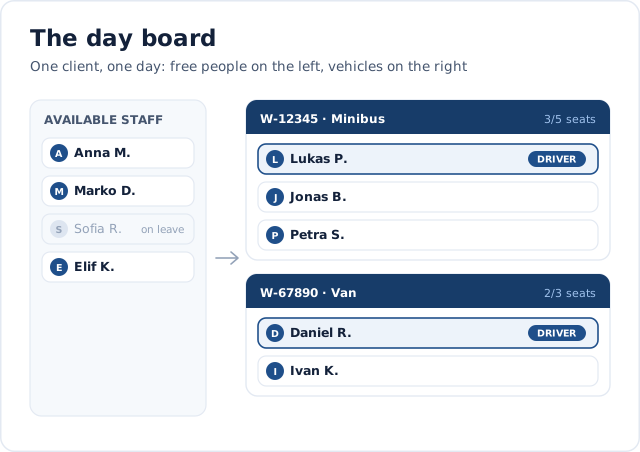
The dispatch board is a daily board: for a given client and date, you define who travels in which vehicle. Because dispatch and shift planning share the same assignments, every allocation automatically appears in the weekly and monthly views as well – there is no second planning world to maintain.
Why scheduling with vehicles is so complex
As soon as employees are not travelling independently but vehicles and carpooling arrangements come into play, a standard shift plan is no longer enough:
- Who is free today is in one list, who is on leave in another, and who called in sick you learn by phone in the morning
- A vehicle gets double-booked because two people are planning at the same time
- On the day it turns out the assigned driver does not hold the required authorisation
- More people than seats – noticed only in the car park
- The plan goes out by WhatsApp; whoever does not reply may or may not have seen it
- If something changes the night before, nobody knows who has the old version and who the new one
How the dispatch board works
One board per client and day, available resources on the left, vehicles on the right – and rules running in the background that prevent incorrect scheduling.
You select a client and date and see two pools: the available staff and the available vehicles for that day. The staff pool automatically factors out anyone already assigned elsewhere, anyone on approved leave, anyone signed off sick, and anyone on a fixed schedule. You only dispatch with people who are genuinely free.
Via drag-and-drop you assign staff to a vehicle. Each vehicle has a defined seat count, capacity utilisation is visible at all times, and the system checks capacity when you finalise the plan. There is exactly one driver per vehicle per plan — enforced by the system, not just a convention.
The decisive element is qualifications. Staff members hold qualifications, and both vehicles and clients can require them. If a staff member lacks a qualification required by the vehicle, the driver toggle cannot be switched — with the reason shown clearly. Matching qualifications are highlighted as a positive match; missing ones are flagged just as prominently. Individual staff members can also be excluded from specific clients.
A daily plan starts as a draft and is then finalised. If a finalised plan is edited again, the system recognises it as an update. New daily plans are pre-filled from the most recently finalised plan for the same client — making recurring runs a matter of seconds rather than minutes.
What Scheduling Delivers Day to Day
Plan only with people who are genuinely free
The pool filters out leave, sickness, fixed working hours and existing assignments. Anyone booked elsewhere appears greyed out with where and why – rather than not at all, so you can still reschedule if you need to.
Mistakes prevented, not logged
Seat count, one driver per vehicle, a missing driving authorisation, excluded employees: all of these are checked while planning and again when closing. A plan that does not add up cannot be closed.
Everyone knows what to expect
On closing, each assigned person receives exactly one notification – customer, date, start, vehicle and driver. The driver instead receives their driver briefing including the list of passengers.
Changes are recognisable as changes
If a closed plan is changed again, the system does not resend an identical message but shows each recipient what has changed compared with the version they last received.
Recurring runs in seconds
A new day plan is pre-filled from the last closed plan for the same customer. Anyone unavailable today drops out automatically – you only correct the differences.
The supervisor sees the status
On the day a dashboard card shows who has already clocked in and who is still missing, refreshed automatically. A supervisor sees their own team, not the whole company.
Five Steps to a Finished Daily Plan
-
Pick the customer and the day
The board opens on tomorrow by default – in practice planning happens the day before. Any board can be shared straight from the address bar.
-
Start the day plan
On starting, the last closed plan for the same customer is carried over as far as those people and vehicles are available today. With nothing to carry over you begin with empty vehicles.
-
Drag people onto vehicles
From the pool of free employees onto a vehicle by drag and drop. The load per vehicle is visible, as is which qualifications somebody brings and which are missing.
-
Set the driver
Exactly one driver is set per vehicle. Anyone without the authorisation the vehicle requires cannot be made driver – with the missing certificate named. Where a regular driver is stored, they are proposed automatically.
-
Close the plan
On closing, the system checks capacity, driver and crew composition. Only then do the notifications go out – a draft sends nothing.
Features at a Glance
Two pools instead of searching
On the left the employees free today, next to them the free vehicles. People already booked appear greyed out with the reason – another customer, leave or sickness.
Drag and drop
Drag employees onto a vehicle, move them between vehicles, drag them back to the pool. A without vehicle group is available too, for anyone travelling under their own steam.
One driver per vehicle
The rule is anchored in the database, not just in the interface. When a new driver is set, the previous one loses the role automatically.
Qualifications on vehicle and customer
A vehicle can require that at least a given number of the crew hold a qualification – and that the driver holds it personally. Customers can set requirements too.
Customer exclusions
Individual employees can be blocked for particular customers. They then never appear as plannable, instead of being rejected at closing.
Delivery report
After closing you can see who the notification reached and who it did not. If somebody signs in later, they drop off the list by themselves.
Export as PDF, Excel or CSV
The finished day plan can be output – for the noticeboard, for the client or for the archive. Driver rows are highlighted in it.
Drafts clean themselves up
Drafts that were never closed are deleted once their planning day lies more than seven days in the past. Closed plans are left untouched.
What dispatch looks like
Two views explain more than a description: the board itself – and the rule that stops anyone without the required licence from getting behind the wheel.

One board per client and day
On the left are the employees who are genuinely free that day; anyone on leave or off sick appears greyed out with the reason. On the right, the vehicles with their crews, the seat counter and exactly one marked driver per vehicle. Employees are dragged onto a vehicle, moved between vehicles or dropped back into the pool.

The driver check
A vehicle can require a licence – a particular category, for instance. Anyone who does not hold it cannot be set as driver in the first place, and the interface names the missing document. That is the difference between a warning you click away and a rule that holds: the mistake surfaces while planning, not on the day in the car park.
Callback
What would this look like in your business?
A quick call: we look at your processes around “Dispatch” with you and tell you honestly whether and how Jobilino fits.
- We call you back – free & no obligation
- Reply within one business day · No sharing with third parties
Prefer to call right away? +43 664 5031382
Connected to What You Already Use
Scheduling is not a standalone island — it is another view of the same data:
Staff scheduling
A dispatched assignment is the same assignment as in the weekly plan. No second planning world appears that would have to be maintained in parallel.
Time tracking
On the day, the people assigned clock in as usual. The live status compares plan and entries and shows who has already started.
Vehicles
The vehicles are the same ones kept in the mileage log. Seats, registration and regular driver exist in one place only.
Qualifications
The same certificates held in the qualification matrix govern eligibility to drive here. When one expires, it immediately affects who can be planned.
Notifications
Delivery runs through the same channels as every other message – in the system and as a push to the phone.
Typical Use Cases
Wherever teams travel together to changing assignments, scheduling replaces paper slips and spreadsheets.
Frequently Asked Questions about Scheduling
Does the dispatch board plan day by day, or can I also plan monthly?
How does Jobilino prevent someone without the right qualification from driving?
What qualifications can I set up?
How does the system know which employees are available?
Can a vehicle be overbooked?
Can I exclude specific employees from specific clients?
Do I have to rebuild recurring runs from scratch every day?
What do "draft" and "finalised" mean?
Does dispatch replace Staff Scheduling?
Is dispatch included automatically?
Can I also manage jobs and plan assignments with AI in Jobilino?
See Scheduling in Action
The scheduling module is activated for your organisation. In a short demo we will show you a real daily board — complete with vehicles, pools, and the driver qualification check.
Prefer to call right away? +43 664 5031382