
Travel expenses that settle themselves during the trip
Your employees create the business trip in the app and photograph every receipt. Jobilino calculates per diems, overnight allowances and mileage – and at the end of the month the travel expense statement is ready.
- Per diems calculated automatically
- Receipts with a photo, even without signal
- Accommodation per employee and site
- Monthly statement as Excel and PDF
- Runs on
- Capture in the app, statement on the web
- Works with
- Time tracking, projects, monthly reports
- Typical for
- Installation, construction, service technicians
A business trip starts when someone leaves home and ends when they return – not with the first and last clock-in. That is what per diems are based on. Jobilino therefore records the trip as a process of its own, in the same system as working time: departure and return are suggested from the clock-ins, provided meals are ticked per day, receipts are photographed on the spot. The amount follows from that.
One business trip, worked out day by day
Off to Leipzig on Monday morning, back on Wednesday evening, two nights in a hotel. On Tuesday the client pays for lunch. This is the amount at the German rates:
- Meals, day of arrival€14.00
- Hotel per receipt€92.00
- Meals, 24 hours€28.00
- Lunch provided−€11.20
- Hotel per receipt€92.00
- Meals, day of departure€14.00
For the trip€228.80
For Austria Jobilino counts in 24-hour blocks from departure. Trips to other countries are recorded with all receipts; your tax adviser confirms what applies.
Why travel expenses take so much time
The trip is over, but the paperwork has only just begun. In most companies it goes like this:
- Receipts pile up crumpled in the glovebox and are incomplete at the end of the month
- Departure and return times are filled in from memory
- Provided meals are forgotten – the per diem is set too high
- Payroll recalculates every trip by hand in a spreadsheet
- Only the site foreman knows which crew stayed in which guesthouse
- Higher rates under a collective agreement are not separated cleanly from the tax-free part
How travel expenses work with Jobilino
One process from departure to payroll – no slips of paper, no recalculating.
The employee creates a business trip in the app: destination, departure and return, means of transport and, if needed, the project. Jobilino suggests departure and return from the day's clock-ins – they stay editable, because the journey from home usually starts before the first clock-in.
For each day of the trip they tick what was provided: breakfast, lunch or dinner, accommodation. Every receipt – hotel, fuel, parking, tolls, train – is photographed on the spot and linked to the trip. This works without signal too; the app sends as soon as there is network again.
From the trip, the days and the receipts Jobilino calculates per diems, overnight allowances and mileage at the statutory rates for Austria and Germany. If your company pays more under a collective agreement, you store the higher rates – the tax-free and taxable part are shown separately. Trips to other countries are recorded with all receipts and reimbursed as spent.
For accommodation – guesthouse, hotel, crew quarters – there is a period per employee, linked to the site if needed. At the end of the month travel expenses and accommodation appear as columns in the monthly time sheet, and the travel expense statement is ready as Excel and PDF.
What changes day to day
The receipt is there before it gets lost
It is photographed at the moment of payment, at the petrol station or the hotel reception. The receipt is attached to the trip straight away and no longer has to be found at the end of the month.
Correct amounts instead of estimates
The per diem follows from departure, return and the meals provided – not from a round number someone typed in. Reductions are not forgotten.
Two rule sets, one system
Austria counts in 24-hour blocks from departure, Germany by day of arrival and departure. Jobilino knows both and applies the rules of the destination.
Collective agreements without side calculations
Higher rates under a collective agreement are stored once. Anything above the tax-free amount is automatically shown as taxable.
Who slept where is known
Accommodation is recorded with a period per employee. Who spent which night in which guesthouse can be traced weeks later without asking around.
Ready at month end
The travel expense statement is built from the month's data. Once the monthly report is closed, the amounts are fixed and no longer change.
Four steps from departure to statement
-
Switch on travel expenses
Travel expenses and accommodation are switched on for the company and enabled per user group. If needed, store the rates under your collective agreement.
-
Create the business trip
The employee creates the trip in the app. Departure and return are suggested from the clock-ins, the destination can be set on the map.
-
Capture receipts and days
Receipts are photographed, provided meals and accommodation are ticked per day. Without signal on the road, everything is saved and sent later.
-
Settle the month
The travel expense statement per employee is ready as Excel and PDF. It is closed together with the monthly report.
What’s included
On the road
- Create the business trip in the app, even without signal
- Photograph receipts on the spot, the photo can be mandatory
- Tick provided meals and accommodation for each day
- Destination on the map, distance to the company as a hint
Calculation
- Per diems for Austria and Germany calculated automatically
- Reduction for provided meals, hotel per receipt or flat rate
- Mileage for car, motorbike, bicycle and passenger
- Higher rates under a collective agreement, tax-free and taxable part shown separately
Statement
- Accommodation with a period per employee, per site if needed
- Travel expenses as a column in the monthly time sheet
- Monthly travel expense statement as Excel and PDF
- Closed with the monthly report, unchanged afterwards
What a business trip looks like in Jobilino
Two views: the statement at the end of the month – and the receipt that makes it possible on the road.

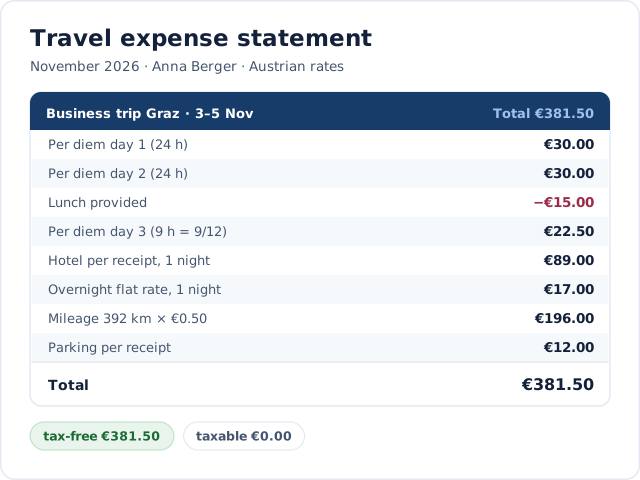
The statement does the maths
Per diem per 24 hours, the reduction for a provided lunch, the part-day at the end, hotel per receipt, mileage and parking – with the tax-free and taxable part.

The receipt comes with its photo
Photographed at the reception, linked to the business trip and saved even when there is no network.
Demo
What would this look like in your business?
In a short demo we look at your processes around “Travel Expenses” with you and tell you honestly whether and how Jobilino fits.
- Personal demo – free & no obligation
- Reply within one business day · No sharing with third parties
Prefer to call right away? +43 664 5031382
Connected to time tracking
Travel expenses are not a separate program next to time tracking, but part of it:
Clock-ins as a suggestion
Departure and return come from the day's clock-ins and do not have to be entered again.
Column in the monthly time sheet
Travel expenses and accommodation appear per day in the monthly time sheet – on screen, in the PDF and in the Excel export.
Projects and sites
A business trip and a stay can be assigned to a project, so you can see what a site costs in travel expenses.
Mileage log
If you use the mileage log, the kilometres driven are already in the same system.
Monthly report
Closing the monthly report fixes the travel expenses – a later change of rates does not alter a settled trip.
Especially relevant in these industries
Wherever employees work away from home for several days and stay overnight.
Frequently asked questions about travel expenses
Which rules does Jobilino use to calculate travel expenses?
What happens when a meal was provided?
Can we pay higher rates under a collective agreement?
Does every receipt have to be photographed?
Does it work without signal?
How is accommodation recorded?
What does payroll receive at the end of the month?
Who can see the travel expenses?
Travel expenses without collecting receipts
In the demo we create a business trip in the app, photograph a receipt and show the finished travel expense statement for the month.
Prefer to call right away? +43 664 5031382