
Few topics spark discussion in a team as reliably as the smoke break. Some step outside for five minutes three times a morning, others work straight through – and rightly wonder why both end up with the same hours on the timesheet. At the same time, hardly any business wants to time every cigarette with a stopwatch. This article explains what the law says, which rules have proven themselves in practice – and how Jobilino records smoke breaks automatically, without anyone having to do the maths.
Note: this article describes what a time-tracking system documents; it is not legal advice. Collective agreements, works agreements and the law of your country may set different rules – if in doubt, check the version that applies to you.
1. Is a smoke break working time?
In short: generally not. In Austria and Germany, for example, no law regulates smoke breaks – let alone grants a right to them. Anyone smoking is not working during that time. Whether the time is paid anyway is the employer's decision: in the employment contract, in a works agreement or simply through how things are done in practice.
That everyday practice is exactly the risk. An employer who silently tolerates smoke breaks running as full working time for years creates an expectation that is hard to reverse later. It is cleaner to set the rule explicitly and to record it consistently.
2. Does a smoke break count as a statutory rest break?
Usually not. Statutory rest breaks have minimum lengths. Two examples:
- Austria: under Section 11 AZG, more than six hours of work entitles employees to a 30-minute rest break, which may be split into two parts of 15 or three parts of 10 minutes.
- Germany: under Section 4 ArbZG, 30 minutes of break are required after more than six hours and 45 minutes after more than nine; only periods of at least 15 minutes count as a rest break.
A five-minute cigarette therefore does not normally replace the lunch break. Smoke breaks are something of their own – and that is exactly how they should be recorded: separately from the normal break and separately from working time.
3. Three rules that work in practice
Option A: smoke breaks are unpaid
Every smoke break is clocked out and does not count as working time. Legally this is the clearest solution and the fairest to non-smokers. The downside: having to clock out and back in for every cigarette quickly feels like surveillance – especially when clocking is cumbersome.
Option B: smoke breaks are paid
The business counts smoke breaks fully as working time. That is convenient, but non-smokers often see it as unfair, and it has no upper limit. Without recording, nobody knows how much time actually adds up.
Option C: a daily allowance – the fair middle ground
The business gives every employee a fixed amount of time per day, for example 10 minutes, that counts as working time. Anything beyond that is recorded but not paid. It is generous enough not to patronise anyone and reliably caps the cost. To be fair, many businesses offer the same allowance to non-smokers for a short break too.
Whichever option you choose: write it down, tell the team – and let the time-tracking system do the arithmetic, not the foreman.
4. How Jobilino records smoke breaks
In Jobilino, the smoke break is an answer of its own when clocking out. When interrupting work, employees do not only choose between “Break” and “End of work” but also “Smoke break” – in the app, in the browser, via NFC tag and at the time clock terminal. That is all the employee has to do.
The allowance calculates itself
Under “Time tracking” in the administration you switch on smoke break clocking and set how many minutes per day count as working time – between 0 and 60 minutes in five-minute steps. That covers all three options:
- 0 minutes = smoke breaks are recorded but not paid (option A).
- 10 minutes = the fair middle ground (option C, the default).
- 60 minutes = smoke breaks are practically fully paid (option B with a cap).
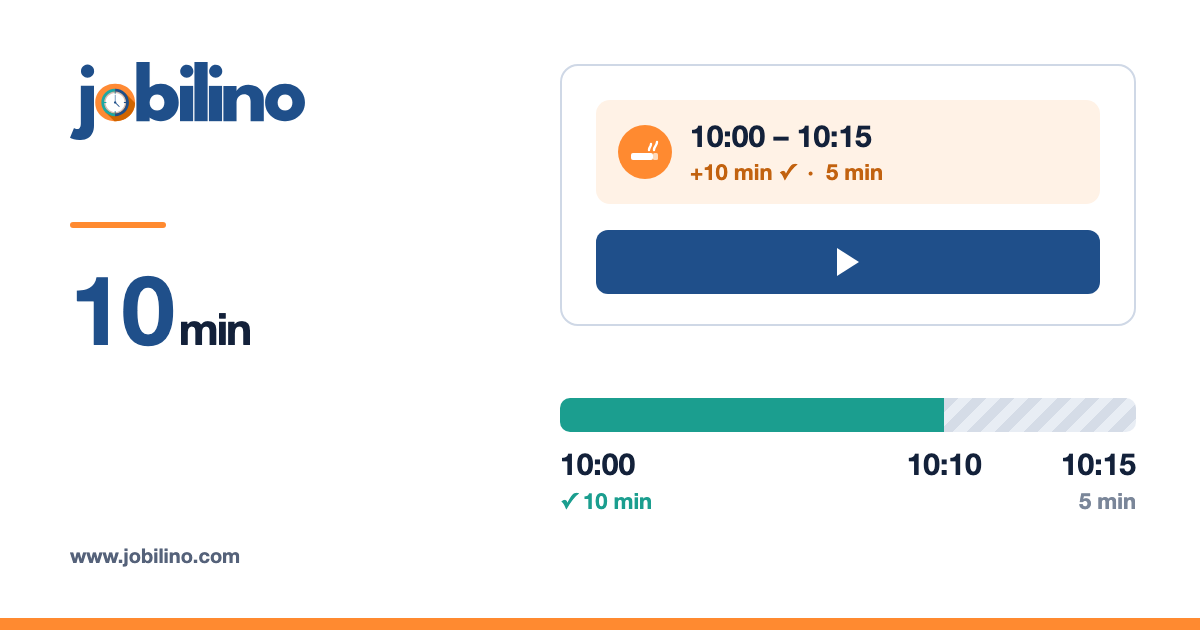
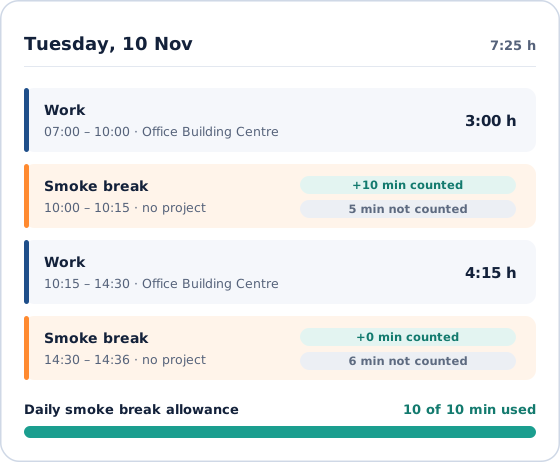
An example with a 10-minute allowance: Anna takes a smoke break at 10:00 and clocks back in at 10:15. Jobilino counts 10 minutes as working time; the remaining 5 minutes are recorded but not counted. If Anna takes another smoke break in the afternoon, the allowance for the day is used up – that time is also visibly recorded but does not count. The allowance is used in the order of the clockings and applies per calendar day.
During the break: see what is left
While the smoke break is running, the app shows for example “Smoke break since 10:12 · 4 min left”. One tap on “Resume work” carries on exactly where the employee left off – on the same project, without selecting it again.
Company time, not client time
The counted minutes are part of paid working time and therefore of overtime, the payroll export and the payroll list. But they are attached to no project: a smoke break never ends up on your client's invoice.
Different for each group
Smoke break clocking can be switched on or off per user group. You might offer it to the site crew, for instance, while the normal break rule applies in the office.
Transparent in every report
Every smoke break appears in the monthly view as a row of its own – with start, end, counted and uncounted time. The same figures appear in the PDF timesheet, the Excel export and the closed monthly report. Anyone who asks gets a traceable answer instead of a gut feeling. Forgotten clockings can be added later as a separate entry type “Smoke break”; the allowance adjusts automatically.
5. Checklist for the introduction
- Set the rule: unpaid, allowance or paid – and how many minutes per day.
- Put the rule in writing, in the employment contract or a works agreement; involve a works council early.
- Explain to the team why it is recorded: not for control, but so that smokers and non-smokers are treated equally.
- Decide which groups are offered the smoke break.
- Look at the report after the first month: does the allowance match reality?
Conclusion
Smoke breaks are not working time – unless you deliberately decide otherwise. The fairest solution is usually a small daily allowance that is counted automatically, while anything beyond it stays visible but unpaid. With Jobilino this is one switch and one number: the employee chooses “Smoke break”, the time-tracking system does the rest – traceable in every timesheet and without any discussion at the end of the month.
Try Jobilino for free – or book a demo and set up your smoke break rule together with us.