
By November at the latest, every business faces the same question: are we off on 24 December? And what about New Year's Eve – full day, half day or a normal working day? Many companies give these days to their staff, some add the birthday too. A kind gesture, but often badly handled in practice: half the team books annual leave, the other half does not, payroll wonders how the day should be paid – and whoever is sick on the 24th wants to "make it up". This article explains what the law says, which rules you should settle in advance and how Jobilino enters such special days automatically – paid and without using a single day of annual leave.
Note: this article describes what a time-tracking system documents; it is not legal advice. Collective agreements, works agreements and the law of your country may contain their own rules for 24 and 31 December – if in doubt, check the version that applies to you.
1. Is Christmas Eve a public holiday?
In most of Europe, no. In Austria and Germany, for example, neither 24 December nor 31 December is a statutory public holiday. The public holidays are 25 and 26 December and 1 January. Legally, Christmas Eve and New Year's Eve are ordinary working days.
Whether people are off anyway is decided on three levels:
- Collective agreement: some agreements regulate 24 and 31 December explicitly – in Germany, for instance, the public-sector agreement TVöD grants paid time off on both days where operations allow.
- Employment contract or works agreement: here the employer can promise days off – full or half.
- Everyday practice: an employer who grants the days year after year without any reservation creates an expectation that is hard to withdraw later. If you want the days to remain voluntary, say so explicitly.
The same applies even more clearly to the birthday: there is no statutory right to a day off on your birthday. It is a gift from the employer – and that is exactly why it should follow the same rule for everyone.
2. Special leave or special day – what is the difference?
The two terms are often mixed up but mean different things:
- Special leave is time off for a personal reason: your own wedding, the birth of a child, a death in the family, a house move. In Germany the basis is Section 616 BGB, in Austria among others Section 8(3) AngG; many collective agreements list the occasions and the number of days. Special leave arises when the event happens – it cannot be entered for everyone in advance.
- Special days are days off the business grants every year on the same calendar date: Christmas Eve, New Year's Eve, a company day – or each employee's birthday. They can be planned and are the same for everyone.
In both cases the time is paid and must not reduce the annual leave entitlement. Booking a day of annual leave for it takes away something employees are not supposed to lose.
3. Questions to settle in advance
A day off sounds simple. Trouble arises at the edges – so it pays to decide these points once:
- Full or half day? Many businesses give the whole of 24 December and half of 31 December.
- What if the day falls on a day off? If 24 December falls on a Saturday or Sunday, the special day lapses – or moves to the next working day. Both are common; what matters is that the rule is the same for everyone. The same goes for part-timers whose day off happens to be the 24th.
- What if a public holiday falls on the same day? A public holiday is off anyway; the special day is then not credited on top.
- What if someone is sick on the special day? Most businesses decide that the sick day replaces the special day and it is not made up.
- Who is entitled? All employees or only certain contract groups? In Jobilino this is tied to the leave policy – so different groups can get different special days.
- Put it in writing: in the employment contract or a works agreement, with a voluntariness reservation for voluntary benefits; involve a works council early.
4. How special days work in Jobilino
In Jobilino, special days are part of leave management. You set them once in the leave policy – the system takes care of the rest every year.
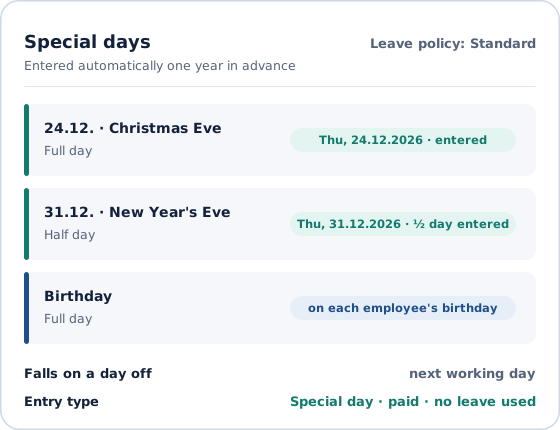
Set it once: which day, full or half
In the leave policy you add the days your business gives: a fixed calendar date such as 24.12. or 31.12., or the birthday. For each day you choose full day or half day. You also decide what happens when the day falls on a day off: it lapses or moves to the next working day. The days are booked with their own entry type "Special day" – Jobilino creates it for you at the click of a button.
The form already shows what will happen this year, for example "Thu, 24.12.2026 – will be entered" or "Falls on a Saturday – moved to Monday".
Entered automatically – one year in advance
Jobilino enters the special days for every employee on this leave policy one year in advance – approved, paid and credited with the contractual daily working time. Nobody has to submit a request, nobody has to remember. New starters get their special days from the start of their contract; leavers only up to the end of it.
No annual leave is used
A special day counts as a paid day off, not as annual leave. If someone books leave across a special day, that day is not deducted from the leave balance – Jobilino calculates this correctly, whether the leave was entered before or after the special day.
Public holiday, half holiday, sickness: clear rules
- If the day is a full public holiday, no special day is entered – the day is off anyway.
- If it is a half public holiday, the special day adds the second half: together the employee is off for the whole day.
- If someone falls sick on a special day, the sick day takes its place; the special day is removed.
Birthdays with privacy in mind
For the birthday off, Jobilino uses the date of birth from the master data. Only the employee, administrators and authorised HR staff can see that the day off is a birthday. Everyone else just sees a day off – without the reason.
Visible in planning, the app and the payroll export
A full special day counts as an absence in shift planning, a half one is shown as a hint – so nobody accidentally schedules a colleague on 24 December. In the time-tracking app employees see their special days in the monthly view. In the monthly report they appear as a row of their own, in the payroll export as a separate pay component you can map to its own wage type. And in the reports, full special days do not count as scheduled working days – so the sickness rate stays correct.
Waiving is possible, editing is not
If an employee wants to work on the special day after all, the entry can be deleted – that counts as a waiver, and Jobilino does not enter the day again. Who may do this themselves is set in the user groups. A special day cannot be edited, however: it always follows the rule of the leave policy.
5. Worked example: Christmas leave 2026
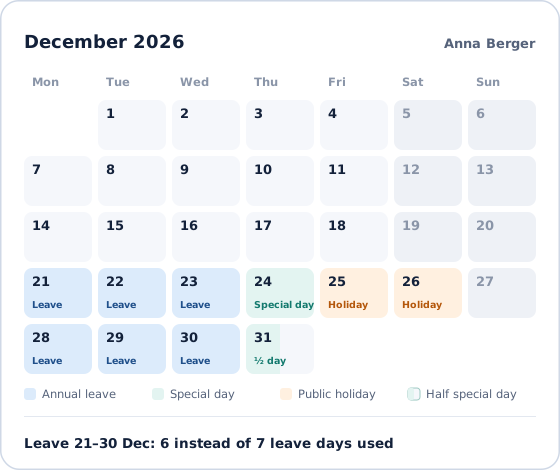
Anna takes leave from 21 to 30 December 2026. Her leave policy gives the whole of 24 December and half of 31 December. This period contains seven working days from Monday to Friday – 25 December is a public holiday, the 26th falls on a Saturday. Because 24 December is a special day, Anna uses only 6 instead of 7 days of annual leave. On 31 December she works half the day; the other half is her special day.
How public holidays themselves are maintained and credited is described in the handbook under public holidays.
6. Checklist for the introduction
- Decide which days are off: 24.12., 31.12., the birthday or a company day of your own – each full or half.
- Decide what applies when the day falls on a day off or a public holiday.
- Put the rule in writing and add a voluntariness reservation for voluntary benefits.
- For the birthday off, switch on and maintain the date-of-birth field in the master data.
- Add the special days to the relevant leave policies – and check the preview in the form.
- In the payroll export, map the special-day component to a wage type if your payroll wants to see it separately.
- Tell the team: nobody has to request leave for these days.
Conclusion
Christmas Eve, New Year's Eve and birthdays are not public holidays – but popular gifts to the team. To make them apply equally to everyone and cost nobody a day of leave, they belong in a clear rule and in a time-tracking system that applies that rule itself. With Jobilino you set the special days once in the leave policy; from then on they appear in the calendar in good time every year, are paid, shown cleanly in the payroll export and taken into account in planning.
Try Jobilino for free – or book a demo and set up your Christmas special days together with us.